GMail POP3 Checker for Greasemonkey and Chrome (Automatically!)

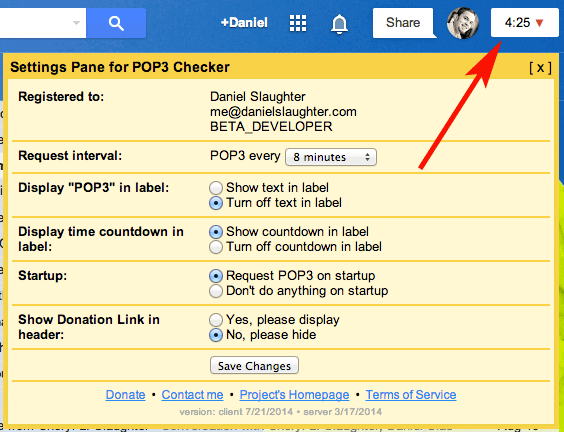
GMail POP3 Checker Screenshot

Introduction

I realize this script does not exist anywhere on the internet, and since I wrote this a while back and have been happily using it for quite some time I’ve decided to make it public. It’s quite a simple script. First, it’ll put a “POP3″ link at the very top right corner of your Gmail page. Second, based on what time interval (in minutes) you select (defaults is 8) it’ll automatically run it for you that often. No more of this waiting for Gmail to check it every 60 minutes stuff! If you do not want it to automatically check just set the time interval to None; this way you’ll at least have the link to manually click at any time.

Donate

Did this script change your life? (I like to think so)

Download

Click here to download this fancy script!
Downloading and/or installing this script signifies your acceptance of the Terms of Service.

If you’re feeling generous and appreciate the work I’ve done, and will continue to do, please consider donating (see above).

Please let me know if you have any other feedback pertaining to this script that may come in handy for future releases.

Installation Directions

Firefox You will first need to install an Add-on called Greasemonkey. Once this is installed and you’ve restarted Firefox come back to this page and click the download link to my script. A new type of popup will appear asking you to install it. Click “Install” and then refresh Gmail and you’re all set. To later remove or disable the script you can right-click on the Greasemonkey logo in your status bar (it looks like a monkey’s head), click “Manage User Scripts,” select “Gmail Select POP3 Now” and then either un-check “Enabled” or click “Uninstall.” Also removing the Add-on Greasemonkey will permanently uninstall it.
Google Chrome Simply click my download link in this page. A little popup in chrome will appear at the bottom of your page asking if you want to enable/install it. Once you’ve enabled/installed it then refresh Gmail and you’re all set. To later remove or disable the script you can do so from your Extensions section of Chrome.
Opera I personally have never done this but someone contributed a comment a while back with directions on how to do this. Basically you will need to download this Greasemonkey Emulator for Opera and then rename my script (aagmfunctions.js) to “00.gmfunctions.user.js” (or something along those lines). Then in the Opera configurations you need to add “opera:config#UserPrefs|UserJavaScriptonHTTPS” and check the main checkbox to enable it.
Internet Explorer (IE) There is a Greasemonkey for IE executable available which I have yet to test. Theoretically if it’s using the same Greasemonkey library as Firefox you should be able to install it for IE and then include my script. Further installation directions are not provided and I cannot guarantee this will work. If you do discover this does (or does not) work please let me know.
Safari There is a Mac only GreaseKit for Safari (and a couple other platforms) which will emulate Greasemonkey User Scripts. I have never tried this, but feel free to attempt it and let me know what you find out.

FAQs

  • When I view the Settings/Accounts page and click the “POP3″ link it doesn’t tell me it’s checking my mail, why?
    The script runs asynchronously in the background and does not manipulate your view. Thus, you will not see the Settings/Accounts page inform you of the update. However, if you click the “View history” link next to any of your accounts appropriately one minute after clicking the “POP3″ link you’ll see that it truly has updated.
  • Will your script check more than one of my POP3 accounts?
    The script will check every POP3 account you have entered into Gmail.
  • What is the minimum donation to unlock the additional settings?
    The minimum donation is currently set to $1, and the average donation is approximately $4. However, no one likes to be average, right? :)

Change Log

February 15, 2012

  • Sadly Firefox wasn’t playing nice with the new layout, so I’ve rolled it back to the old version where the POP3 script is displayed next to your name/email address in the top right corner. All cosmetic issues should be fixed now, but if not please let me know.

February 12, 2012

  • Fixed a bug I caused from yesterday’s update which prevented Firefox users with the oldish version of Gmail from searching. Sorry! If you are still experiencing issues with this please do let me know.

February 11, 2012

  • Another update by Google reimplementing their black-bar (but of course a completely different set of code) broke the placement of the POP3 script. This bug has been fixed. Gmail now has about 6 different templates, and if your script isn’t working properly please do let me know as it is possible it is broken with the new code.

December 13, 2011

  • After another update by Google the placement broke, preventing the script from fully loading. This bug has been fixed.

December 9, 2011

  • Fixed the misplaced POP3 countdown/text on the new Google header. It should now be located under your name or email.

December 5, 2011

  • Required upgrade. If the upgrade doesn’t work in Firefox with Greasemonkey you may have to uninstall the previous version before installing the new one.
  • Added support for new Google header.

November 13, 2011

  • Fixed a bug where the script would error with missing element “:pn” if the setting for “Refresh” was turned on during start-up in Firefox 8.0.

August 1, 2011

  • Fixed a bug introduced by a new version of Gmail which prevented the client side script from loading in Google Apps or non-Google+ Themed templates. This update is not required, but if you’re experiencing problems with your current client version 2/17/2011 loading you’ll want to upgrade. (Thanks Ertugrul)

July 25, 2011

  • Fixed a cosmetic text-coloring issue caused by the new Google top-banner strip and other dark themes to better contrast the textual countdown.

February 23, 2011

  • Added support to re-check if internet connectivity is lost. You will see the message “Connectivity Lost” and the script with start over at a 3 minute countdown if this happens. This may occur if you put your computer to sleep/hibernate, you enter offline mode, or you actually loose internet or drop wireless. (Thanks Vito E., and Jeff W.)
  • Fixed a small cosmetic issue caused by the new Google top-banner strip.

February 17, 2011

  • Added support for Gmail’s new top banner strip, but also kept backwards compatibility with Google Apps. This is HIGHLY Beta and may cause cosmetic issues. (Thanks Charles E., Bob, Lachelle, Benjamin N., and Chris)
  • Required upgrade from September 25, 2010

November 3, 2010

  • Gmail disabled their original user interface, making the script stop POP3ing. I had to change the method it’s using to request for POP3 updates. (Thanks Benjamin N. and Duncan)

October 14, 2010

  • Optimized the Refresh setting to be more efficient.
  • Fixed an issue where the Refresh setting would “flicker” the compose screen and navigate you to the top of the page. Now refreshes are only done in the background on any of the list pages: Inbox, Sent Mail, All Mail, Trash, etc. (Thanks Nick N. and Adam)

October 12, 2010

  • Added full support for all Labs. Some Labs were preventing the POP3 link/counter from appearing or showing correctly; such as “Google Search.” (Thanks John-Paul C., Dave B., Jason S., and Matt V.)
  • Fixed a broken link in the Terms of Service.

September 30, 2010

  • Changed the mime-type of server requests to text/javascript to prevent warnings in Chrome. (Thanks Dave B.)

September 26, 2010

  • Added popup with help information in the event an upgrade cannot be successfully made (Thanks Paul B.)
  • Fixed a bug in Chrome caused by today’s earlier release due to a new line character in an alert box which Chrome does not support… Sorry! (Thanks David C., Mark H., and Pootle)
  • Added the beta/new/experimental option to Refresh after POP3ing. Please let me know if you run into any issues while using it. (Thanks Daniel M., Dimas, and Halil O. for previously suggesting this feature)

September 25, 2010

  • Added HTTPS support to prevent Chrome from throwing SSL Certificate issues (Thanks all who’ve donated as it helped pay for the server certificates)
  • Corrected rare cosmetic issues with the header links (Thanks Aaron W.)
  • Added Change Log to settings pane
  • Fixed a bug implemented by Gmail’s source code which caused the setting’s pane to overtake the window in Firefox
  • Required upgrade from September 9, 2010

September 9, 2010

  • Added the Settings pane (AWESOME!)
    • Request interval (3-60 minutes)
    • Display “POP3″ in label
    • Display time countdown in label
    • Toggle POP3 on startup
    • Donation link with toggle
    • Reportable errors
  • Now works in Google Apps sites! Hooray!
    • Runs independently from the normal Gmail site and in as many Apps as you have open
  • Displays “POP3 Accounts Missing” if none were found
  • Centralizes the code for easy updating without requesting a new download (for most cases)
  • Moved POP3 link from the far right to next to “settings”
  • Loads instantaneously on slow or fast connections without fail.
  • Makes less requests to Gmail to obtain account information.
  • Sends out a POP3 request quietly and quickly (less than 1 second).
  • Fixed many bugs which were incorrectly gathering the accounts email address needed to POP3 properly.
  • Added script stealing preventions to protect the masses; and my reputation (sorry script kiddies).
  • Tested stable in Firefox 3.6.9 and Chrome 7.0.503.0 dev

April 3, 2010 [download]

  • This is the same exact release as “April 2, 2010 BETA” except I cleaned up the code and removed unnecessary lines of comments. It should now be stable and working properly again.

April 2, 2010 BETA [download]

  • Gmail changed their authentication method with making requests to POP3 accounts. I’ve hacked their code once again to update the script accordingly.
  • I had to remove the option to use iFrames for the requests as the new method can only be done via the POST method. However, it should still function the same.

February 25, 2010 [download]

  • Fixed a very large bug where the number of POP3 accounts you had were miscounted by the script.This should only really affect people with more than 4 accounts, or people with 1. Oh… my silly simple arithmetic skills! (thank you Brad Stinson)

February 24, 2010 [download]

  • Fixed a very large bug where if a POP3 account was ever deleted then any future accounts being added would not be checked. This implies any POP3 account deletion ever occurring, not just after my script was installed. If you’ve had problems with previous versions of this script not POP3ing your accounts, this probably will fix it. (thank you Robert/NRHTX).
  • Fixed a bug where only accounts marked as “Send email as” would be checked. Now all POP3 accounts will be checked, regardless if you’ve set up Gmail to have the ability to send as themselves (thank you Julien Nephtali).
  • Fixed a bug where the “Offline Mode” and “Labs Icon” in the header were not clickable (thank you Jerry Chong and JackieKu).
  • Added support for “googlemail.com” accounts, which typically occur for the German, Chinese, and various other languages.
  • Rolled back the AJAX cross-domain checking to an injected iFrame.
  • Added the variable “useIframe” which will negate the last bullet point, allowing it to use AJAX instead of the iFrames. This should be left to “true” unless you experience issues, then try it as “false.”

February 21, 2010 [download]

  • Fixed a huge bug produced by yesterday’s (2/20/2010) update which only let the counter count down once, check your mail, and then never counted again. Anyone who has the 2/20/2010 update should download the new one immediately (thank you emarell).

February 20, 2010

  • Fixed a bug where if checkEvery was set to 0 the timer would start counting negative if you clicked the “POP3″ link (thank you Robert/NRHTX).
  • Fixed a bug where certain Languages were not supported based on their unique code; such as German (thank you Fred).
  • Changed the method of checking POP3 accounts from an injected iFrame to an AJAX call. Reason being that some people were reporting the update working (which uses AJAX), but not the actual checking of the POP3. This issue seems to have been affecting very few people, but hopefully it’s now fixed (thank you Fred and Reed).

February 19, 2010 (a & b)


Sorry! I hate to keep releasing new versions so often, I promise unless something goes drastically wrong this will be the last one for a while.

  • Fixed a bug where if checkForUpdates was set to false (defaults to true) it wouldn’t countdown to a POP3 correctly.
  • Corrected an issue where when updating a previously installed version of this script it wouldn’t do it successfully.
  • Put a sleep buffer on the words “Fetching…” and “Done!” to confirm your POP3 accounts have been checked.
  • Fixed a bug where if you had checkEvery set to 0 it would tell you to set it to a number larger than 3. This shouldn’t have happened since 0 should mean for the script to not automatically check.
  • Added the variable sendAccountForUpdate (defaults to true) which will send me your account name for contact, update, and bug purposes. I will never share or sell your information in any way, but if something critical happens and the auto update fails this will be my last resort of contact. Otherwise never expect an email from me and the script will continue prompting you for an update if one occurs. If you turn this to false you wont hurt my feelings, but just know you’re limiting yourself from a drastic bug update in the future.
  • Fixed a bug where if you had your Gmail settings for the number of conversations on the page changed to anything but three characters (say you selected “25″ instead of “100″) then it would not pull your account settings correctly, thus failing to POP3. (Thanks Chuck for pointing this out!; reason for version ‘b’)

February 18, 2010 (b)

  • After today’s release I noticed some gmail images were being referenced from the wrong base url because of the way the script is pulling in your account data in the function findAccountInfo(). This has been corrected.

February 18, 2010 (THIS IS HUGE)


  • Fixed a bug where if checkForUpdates was set to false or checkEvery was set to 0 the script would count up instead of have no count.
  • Added the showCountdown flag which will allow you to turn the countdown off if it annoys you.
  • Corrected a https security issue when checking my server for an update.
  • And Probably the greatest improvement of all time: Everything now runs in the background asynchronously and will not navigate to the settings page. Yay! Appreciate this, because you have no idea how deep I had to dig into gmail’s source code to hack out your google identification number and session key to call the “Check mail now” links directly. :D
  • Because everything runs in the background it’ll never tell you that you’re navigating away from a page when composing or replying to a message (which is just awesomeness all over).
  • Dropped the default checkEvery time to 8 instead of 10 since it will no longer annoy you when composing a message.
  • Added a check to make sure you’re not trying to check faster than every 3 minutes… since I’d LOVE if you didn’t get my script banned by Google.
  • I’ve added a “Donate” button to this page (see above) if you’re feeling generous and appreciate the work I’ve done and will continue to do. Don’t feel pressured though!

February 14, 2010 [download]


  • Added a count-down to the POP3 link.
  • Prevented the script from POP3ing if you’re composing a new message.

February 11, 2010

  • Fixed an issue where this wasn’t supported for Google Apps. Thank you Pootle and Ed for catching this!

February 9, 2010

  • The bug where either Firefox 3.6 or Gmail’s Greasemonkey support became unstable, preventing this among other scripts to work, has been fixed. This script no longer uses Gmail’s Greasemonkey support.
  • Updates were made to have more of an aggressive DOM manipulation.
  • The ability for the script to check for updates has been made. It is on by default, but you’re more than welcome to turn it off by setting the checkForUpdates variable to false.

January 15, 2010 [download]


  • Script was released in a stable state using Gmail’s Greasemonkey support

531 Responses to “GMail POP3 Checker for Greasemonkey and Chrome (Automatically!)”

  • Erik Says:

    Please add “E-Mail” as the magic string to recognize the german google apps mail client.

    Thanks!

    • Daniel Slaughter Says:

      Hello Erik,

      Thank you for catching this! I’ve added “E-Mail” to the list in the script. For this change to take effect you’ll need to download the script again. Please let me know if you run into any other problems or have any other questions or suggestions.

      Thank you,
      Daniel Slaughter

  • Valerie Chen Says:

    Hi,

    I’m using Chrome and have been trying to enable this extension.
    After clicking, a pop up come up in the middle of my screen asking me if i would like to reinstall. After clicking it, nothing happens.
    I’ve tried to search for it in my chrome extensions but it isn’t there. please advise.
    Thank you! This script would really change my life!

    • Daniel Slaughter Says:

      Hello Valerie,

      I’m not entirely sure what could be happening. This is the first report I’ve had of Chrome not properly installing the script. When I attempt to install the script in Chrome I first have to click “Continue” from the pop-up in the bottom of the screen, and then “Install” from the pop-up that comes up afterwards. Here’s a screen shot of what I mean: http://getdropbox.com/u/22560/jing/2011-03-24_1039.png

      What version of Chrome are you using? I can see if I can reproduce the problem you’re having in that version. To get the version number on a Mac click “Chrome” on the menu bar, and then “About Google Chrome.” On windows it should be in “Help” and then “About Google Chrome.” Please let me know if you figure out the problem or have any other questions.

      Thank you,
      Daniel Slaughter

      • Valerie Chen Says:

        Hi Daniel,

        Thanks for your quick response! I’m using Chrome version 10.0.648.151, running Windows 7 64-bit. The problem is I’ve never seen that pop up at the bottom left hand corner asking if I should continue. So now whenever I try to click on your download link again, this comes up : http://www.extragravyplease.com/error/error.jpg
        when i click OK, nothing happens.

        any ideas?

      • Daniel Slaughter Says:

        Hello Valerie,

        I’ll give it a shot on my Windows machine at home sometime soon and see if I can figure out the problem. I’m right now on a Mac otherwise I’d try it here. I’ll let you know the moment I figure anything out.

  • vergueishon Says:

    Hi,

    I’m not able to install the script using Firefox 3.6.15 on Mac OS 10.5.8. I get the installation window alright when I click “Click here to download this fancy script!”, and once the install button becomes available after the requisite 3 second timer expires, clicking the button does not do anything. I also cannot view the script source. The only button that does anything is “Cancel.”

  • Adam S Says:

    My script just stopped working about 2-3 weeks ago. It’s not in the title bar of gmail like it used to be. Is this due to some sort of update of Gmail? I noticed a few of the gmail menus look a bit different. How can I get this working again? I’m running Firefox.

  • John Flood Says:

    Hi Daniel

    My problem was the greasemonkey 0.91 hurdle too. Easily fixed with retrofit to earlier greasemonkey, installing POPChecker, and updating greasemonkey.

    Thanks for all the good work!

    John

  • Carl Says:

    Why does the Chrome version of this request access to my data on all websites? Why can’t it be restricted to gmail.com and if needed, your own domain?

    • Daniel Slaughter Says:

      Hello Carl, I’m not entirely sure why Chrome doesn’t interpret the install dialog User Scripts the same way Firefox/Greasemonkey does. Although it is truly only being executed on Google’s Gmail page, I haven’t been able to find a solution to have that installation say otherwise in Chrome. However, thank you for pointing this out and I will in the near future revisit the issue to see what I can find out.

  • Jin Says:

    Hi Daniel,

    I have been using chrome to check my gmail, but I need to use safari sometimes. Your pop3 checker is working well in chrome, but it’s not in safari. My safari version is 5.0.3, and Greasemonkey installed and enabled. I’m not using any google lab, and I access gmail through gmail.com. After logging in gmail, I can see only Loading…, and clicking doesn’t work. Please let me know how to fix this problem. BTW, it works well in firefox.

    • Daniel Slaughter Says:

      Hello Jin, As of right now the only support I have for Safari is the Safari Greasemonkey installation notes I have posted which were provided by someone else. I’ve never actually tried it myself in Safari, but I can see if I can reproduce what you’re experiencing and perhaps fix it in the next release. I will let you know once I do.

      Thank you for reporting this,
      Danie Slaughter

  • Casey Says:

    Daniel,
    I downloaded the grease monkey add on using fire fox on my macbook pro and I am unable to download the script…

  • Ertugrul Says:

    Daniel,

    First of all, thanks for this nice product. But my question is does your script is collect information about our accounts, privacy etc., I have read your privacy policy and I am a bit confused. If you guarentee account privacy, I may also consider donating and unlocking the full functional script.

    • Daniel Slaughter Says:

      Hello Ertugrul,

      The only information I collect is the following:

      • Version number of the script you’re using (eg: 2/17/2011)
      • Your Gmail email address (not your pop3 emails). I need your email address to authorize if you’ve donated and respond with the correct settings configuration.
      • The number of pop3 emails (just a number) to see what use this script is getting.
      • The unique identifier assigned to every script that’s been downloaded. The main reason for this is I’ve had problems with people stealing and taking credit for old version of my script, and this is to prevent/revoke them from doing this.

      I never have nor ever will sell, trade, or share your information with anyone else. I only store the information required for the script to work and have no intent in ever collecting any additional information unless it’s necessary.

      If you have any other questions please let me know.
      Daniel Slaughter

  • Ronsky Says:

    Hi Daniel,
    I’ve been using your script for almost 2 months and it works great up to the banner change by Google. It worked so smoothly, I had forgotten it was there & was reminded when clients complained I wasn’t responding promptly. I installed your new one & all is well again. Thank you for a great product. (I’ve donated and encourage others)

    FYI: I couldn’t install it with Greasemonkey 0.9.1 and like before I had to reinstall with 0.8.7 & then upgraded Greasemonkey. Maybe it’s my Firefox 3.6.9 issue or other conflict?

    • Daniel Slaughter Says:

      Hello Ronsky,

      I’m not entirely sure why the 0.9.X version sometimes has issues downloading the script. I thought I had originally fixed it with the release of 0.9.1, but apparently not. I cannot seem to reproduce the issue on my machine, so I’ll need to try it on others to see if I can.

      Thank you for the feedback!
      Daniel Slaughter

  • John Flood Says:

    Daniel, Your latest update won’t operate on my Macbook although Firefox addins shows it there. I’ve updated Greasemonkey to the lates version 0.91 and uninstalled pop checker and reinstalled but it won’t show in the top right hand corner. However, it works fine on my PC. Bizarre…. John

    • Daniel Slaughter Says:

      Hello John,

      I’d like to assist you in correcting this. Are you by chance using a non-English language, or other plugins which may be effecting this script? Also, which top banner do you see when you access Gmail: old or new? The new one has this little “Gear” logo for the Settings page: http://grab.by/94fU

      Thank you,
      Daniel Slaughter

  • Chris Says:

    Hi Daniel,
    Thanks for the great script. I’ve used it successfully for a while, but it’s no longer working. I am using the latest version of Firefox on a Mac running 10.5.8. I’ve updated to the newest version of Greasemonkey (09.1), and it reports that the script is active and installed, but it does not show up in my Gmail window anywhere, and refreshing does not load any new mail (I sent some test messages). What do you think? Thanks, Chris

    • Daniel Slaughter Says:

      Hello Chris,

      It looks like Gmail just released a new header, which the script is failing to work due to. I’ll see what I can do and hopefully have it working by the end of the day. Thank you for reporting this!

      Thank you,
      Daniel Slaughter

    • Daniel Slaughter Says:

      Thank you again for reporting the issue with Gmail’s new banner strip! I’ve fixed the script to accommodate this change.

      This change altered the actual script you’ve previously downloaded, so you’ll need to download the updated script from the project page as follows:
      http://www.danielslaughter.com/projects/gmail-pop3-checker-for-greasemonkey/

      If you continue to experience problems please let me know so I can look into them.

      Daniel Slaughter

      • Andy Says:

        New script works perfectly and not wanting to wait 8 minutes I did make a donation at 10:12 this morning and anxiously await the unlock.

        Thanks!

      • Daniel Slaughter Says:

        Hello Andy,

        Thank you for your donation! It looks like I already have two Gmail email addresses on file for you which should already be unlocked in your script. One being the email you supplied to WordPress, and the other being your primary Paypal email. If that’s not the case please send me an email with whichever email address you’d like unlocked to me@danielslaughter.com. Since these two email addresses are already in the system all you should have to do is refresh Gmail and the full settings tab should be accessible. Please let me know if you have any further questions.

        Thank you,
        Daniel Slaughter

  • Lachelle Says:

    I’ve been using your script in Firefox 3.6.13 for a short while and have found it useful. However, today (Feb 16,2011) I noticed the POP3 checker no longer working unless I switch to the “Basic HTML” format. Has anyone else experienced this issue? I’m using Greasemonkey 0.9.1

  • Bob Says:

    Looks like Google has rolled out a new top menu bar in GMail. I hope you are able to update again, I’m loving your script!

  • Ronsky Says:

    I’ve been trying to solve this problem for a while and came across your script. Unfortunately I am not able to install it. I have Greasemonkey in Firefox 3.6.9 on a Mac OSx 10.6.
    When I click the download link “Click here to download this fancy script!” it just shows code with no line breaks.
    When I click the download from April 3, 2010 I get the Greasemonkey install dialog. Is there something I’m doing wrong?
    Thanks for any suggestions for creating the script to change my life…or at least keep my life updated.

    • Ronsky Says:

      Oh..Now I see the Greasemonkey update problem. I had updated but didn’t restart Firefox.

    • Daniel Slaughter Says:

      I tried installing the script using Greasemonkey 0.9.1 directly from the link on my website and I too am noticing it’s failure to prompt me to install correctly. This is the first time this has been reported since the 0.9.1 update and I will make sure to look into this very shortly. Until them I’m glad you got it installed by using 0.8.X, and the version you would have installed with Greaemonkey 0.8.X is the exact same version that would run in Greasemonkey 0.9.1.

      At this point you can simply upgrade to Greasemonkey 0.9.1 and my script will stay installed in Greasemonkey without the need to download it from my site, allowing you to have Greasemonkey 0.9.1 installed and my script. Just for some reason it does seem you cannot install my script directly with 0.9.1…. yet :(

    • Daniel Slaughter Says:

      Hello Ronsky,

      I believe I just fixed the issue when downloading the Gmail POP3 Script with Greasemonkey 0.9.1. It had something to do with the headers that were being passed to Greasemonkey. Thank you again for reporting this!

      Daniel Slaughter

  • Leigh Says:

    Anyone else have an issue with the new Greesemonkey update?

  • Leigh Says:

    Just updated greasemonkey and it seems to have stopped the script working! :(

  • Valentin Says:

    Hi Daniel,
    I just installed your script but the POP3 Checker won’t show up in my Gmail when I set the language to German – only English will work. Do you have a solution for me?
    - Valentin

  • Dave Says:

    Greasemonkey 0.9.1 (updated on Jan 24) has fixed the recent problem for me.

  • Ann Says:

    The POP3 mail checker doesn’t start automatically any more in my Gmail. I’m not sure, but it seems to be associated with Greasemonkey’s update yesterday.

    • Steven Says:

      I’m having the same problem after the Greasemonkey update. Firefox 3.6.13, Windows 7.

      • Daniel Slaughter Says:

        Hello Steve and Ann,

        It appears version 0.9.1 of Greasemonkey was released today and works perfectly with the Gmail POP3 Script. So feel free to upgrade to the latest version of Greasemonkey and everything should keep working. Again, thank you for reporting this! Please let me know if you have any other issues.

    • Daniel Slaughter Says:

      Hello Ann and Steven,

      I’m looking into a solution right now, but if I cannot find something which works tonight it may not be until Tuesday before I can look into it.

      Thank you for reporting this,
      Daniel Slaughter

    • Daniel Slaughter Says:

      It appears you are correct that the Greasemonkey update to 0.9 in Firefox is causing a huge issue with thousands of Greasemonkey scripts.

      The primary culprit is the ability for Greasemonkey to use the eval() function, or access scripts on other domains using the @require attribute. The Greasemonkey developers are aware of this and are looking into a solution. I’d imagine this should be fixed by the week’s end, but until then if you’d like to use my script you’ll need to simply just install the last version of Greasemonkey:

      https://addons.mozilla.org/en-US/firefox/addon/greasemonkey/versions/?page=1#version-0.8.20100408.6

      Please let me know if you have any other questions or suggestions.

      Thank you,
      Daniel Slaughter

  • VE Says:

    Hi Dan!

    I just wanted to let you know that I’m still having issues with the script when GMail offline is activated, at least in Firefox. Basically, when GMail’s done fetching and syncing, your script hangs on “fetching”.

    Also, in newer versions, could you change the behaviour of your links (like Homepage) to open in a new tab rather than taking over the window Gmail is in?

    Thanks!

    • Daniel Slaughter Says:

      I still haven’t had a chance to look into making sure the script can bounce back once you go online, but it is on my to-do list. I didn’t realize the other links didn’t pop-up in a new window, and I will make sure to do that with the next batch of changes.

      Thank you,
      Daniel Slaughter

    • Jeff W Says:

      I’m also experiencing the “Fetching…” hang. It happens several hours after I launch Firefox (3.6.13). If I refresh the page, it goes back to working again – for a while at least. I don’t have Offline mode enabled.

      • Daniel Slaughter Says:

        Hello Jeff, I’ve noticed this happening in my client when I suspend my MacBook, and then turn it back on. I’d imagine what’s happening in most cases is people are signing off-line (or their wireless is dropping for just a second) while the script is trying to fetch, and the script just gives up. It’s my number one priority to fix, and I hope to have a solution by next week.

        Thank you for reporting this,
        Daniel Slaughter

      • Daniel Slaughter Says:

        I realize it’s been a while but I believe today’s server update to the script may fix your Fetching hang for internet connectivity loss. Could you give it a shot and see if you continue to experience issues? If you already have the 2/17/2011 script installed all you’ll need to do is refresh Gmail and the server version 2/23/2011 will automatically be applied. Let me know if there’s anything else you run across, or if you have any other questions.

    • LG Says:

      Having the same issue in firefox – mail is no longer being fetched

      • Daniel Slaughter Says:

        Hello LG,

        It appears the Greasemonkey update to 0.9 in Firefox is causing a huge issue with thousands of Greasemonkey scripts.

        The primary culprit is the ability for Greasemonkey to use the eval() function, or access scripts on other domains using the @require attribute. The Greasemonkey developers are away of this and are looking into a solution. I’d imagine this should be fixed by the week’s end, but until then if you’d like to use my script you’ll need to simply just install the last version of Greasemonkey:

        https://addons.mozilla.org/en-US/firefox/addon/greasemonkey/versions/?page=1#version-0.8.20100408.6

        Please let me know if you have any other questions or suggestions.

        Thank you,
        Daniel Slaughter

    • Daniel Slaughter Says:

      I believe I just sent you an email about the fetching hang update to the script. However, I’ve also updated the links to open up in a new window rather than the tab Gmail is in. Good catch! :)

  • Kelly Says:

    I think I love you!! j/k :) But I do love your script! Sending a mere pittance your way. It will at least buy a coffee or two…

  • Eric Says:

    I have downloaded and installed your script in google chrome. But why it doesn’t shown the POP3 link at the right conner of my gmail page?

    • Daniel Slaughter Says:

      Hello Eric,

      Sorry for the delay as I was away from my computer (very atypical). I’m not sure why this would be happening as at this time there are no reported bugs. I’d like to assist you in figuring out why this is happening for you but I’ll need some additional information.

      1. What version number of Chrome are you using?
      2. What Google Labs do you have installed, if any?
      3. Do you have any other Plugins or Scripts installed (such as Better Gmail, or any other Plugins which effect Gmail)?
      4. Are you running Gmail in the browser in which you installed my script (I realize that’s a crazy question, but it wont obviously work unless you are)?
      5. Are you using gmail.com, googlemail.com, or an Apps site (such as a custom domain) to access Gmail?
      6. Have you refreshed Gmail since installing the script?

      If the script is working it should appear in the top right of Gmail next to the “Settings” link as shown here:
      http://www.danielslaughter.com/projects/greasemonkey_gmailpop3/pop3.gif

      Please let me know if you have any further questions.

  • Dan Evans Says:

    Thanks so much for this! Do you think you could change the minimum frequency to be 1 minutes, please?

    • Daniel Slaughter Says:

      Hello Dan, Under section 4 of my Terms of Service I suggest you do not go under 8 minute intervals as Google may get mad and may temporarily ban your account for excessive requests. I put the 3 minute minimum in place so Google will hopefully not permanently shut down this script (as that would be bad) or people’s accounts. Gmail itself will actually only request every 3 minutes if I wrote the script to request faster as a “safety feature” of theirs. So basically anything under 3 minutes wouldn’t do what you’d expect, as much as I wish it would, and possibly hurt more than it helps. Hopefully that makes sense.

      Daniel Slaughter

      • Dan Evans Says:

        Hi Daniel, thanks for your reply. I understand completely. Thanks so much for this amazing service! My work’s Exchange does not have an auto-forward capability, which means that I’m periodically (thanks to you!) grabbing my POP3 email into my Gmail account. I can now use Google’s awesome spam filters. Thanks again!

  • David Says:

    Hi, Google Chrome has an extension sync feature, which synchronizes all of the extensions between different computers.

    All of my extensions sync between different computers, except for this extension. If I want this extension to be on all of my computers, then I must manually install it on every computer.

    If you can add this extension to the list of all extensions, then this extension should sync. (If you are able to do so, please click the link below and add your extension to the list of all extensions). Thank You.

    https://chrome.google.com/extensions?hl=en-US

    • Daniel Slaughter Says:

      Hello David, I will look into getting this script approved and added to the Google Chrome Extensions site. There are some additional steps I have to do to get this to work, as well as some TOS issues I may not be able to overcome. I will let you know what I find out.

  • jodaboda Says:

    Is anyone else having their account temporarily disabled? It’s happened to me a few times in the last week, where google says the account is temporarily suspended, to be re-activated within 24 hours.

    Google’s page of reasons why this may happen says it could be from some automated account checker, and this is the only one I’m using.

    • Daniel Slaughter Says:

      Hello jodaboda,

      No one has reported seeing this message come up. I have witnessed this a couple times developing another script a while back, but never with this one.

      I believe this error from Google can happen if you have your session open on multiple computers. I’d suggest clicking the “Details” link in the footer of Gmail next to the area where it says something like “Last account activity: 34 minutes ago at IP XXX.XX.XXX.XX” and then clicking the “Sign out all other sessions” button.

      Another thing I’d suggest doing is changing the POP3 interval in my script to something less invasive (such as every 15 minutes) for a while to see if that corrects it. I always leave mine at 8 minutes, which I suggest to do in the Terms of Service. Although the script can POP3 every 3 minutes, I highly do not suggest choosing that option so it doesn’t upset Google.

      Hopefully that helps!
      Daniel Slaughter

  • Jeroen Says:

    Thank you so much for this one!
    Been looking all over for this.
    Made a donation right-away. Best 5 bucks I spent today.

    Cheers,
    Jeroen

  • Jory Fisher Says:

    Hi Daniel,

    Thanks for updating your log re: Pop3. It still says “loading” and isn’t working. Any idea how long it will be before we’re back to normal? Appreciate your efforts to help us. Jory

    • Daniel Slaughter Says:

      Hello Jory,

      I may have found a solution for the problem you were seeing. Could you refresh your Gmail account and let me know if it now working correctly? If not, could you possibly email me a copy of your page’s source by clicking “View > Page Source” in your Firefox menu, Copying and Pasting it into an email and sending it to me at me@danielslaughter.com? I cannot seem to reproduce the issue myself and it’s something to do with the GLOBALS variable array in some people’s Gmail accounts.

      Thank you,
      Daniel Slaughter

  • Mike Sammon Says:

    Hi is there any reason why the pop3 on my gmail site doesn’t have the timer any longer and just says “loading” – I did donate when I downloaded the software.
    Hope you can help as its a very useful piece of kit!! – Thanks

    • Daniel Slaughter Says:

      Hello Mike,

      I may have found a solution for the problem you were seeing. Could you refresh your Gmail account and let me know if it now working correctly? If not, could you possibly email me a copy of your page’s source by clicking “View > Page Source” in your Firefox menu, Copying and Pasting it into an email and sending it to me at me@danielslaughter.com? I cannot seem to reproduce the issue myself and it’s something to do with the GLOBALS variable array in some people’s Gmail accounts.

      Thank you,
      Daniel Slaughter

      • Mike Sammon Says:

        hi dan, the counter seems to be working now.
        Fingers crossed it stays ok but if not i will email you the info you have asked for.

        Many thanks
        Mike

  • Ann Says:

    Hi Dan. Thank you for a very useful extension. I have never had any problems with your script and even made a small donation a week ago to show my support. However, yesterday the script stopped working and the ‘POP3 Checker’ in the upper right corner was stuck on ‘loading…’ At the end of the day I was finally able to figure out the problem. It seems that the script stops working when Gmail is used in languages other than English. Hope something can be done about that, cause I really miss using my native language in Gmail. Greetings from Estonia. :)

    • Daniel Slaughter Says:

      Hello Ann,

      I may have found a solution for the problem you were seeing. Could you refresh your Gmail account and let me know if it now working correctly? If not, could you possibly email me a copy of your page’s source by clicking “View > Page Source” in your Firefox menu, Copying and Pasting it into an email and sending it to me at me@danielslaughter.com? I cannot seem to reproduce the issue myself and it’s something to do with the GLOBALS variable array in some people’s Gmail accounts.

      Thank you,
      Daniel Slaughter

  • Steve Says:

    The script just says loading and will not work I downloaded it again and still says loading

    ANy cure for this

    THXS

    • Daniel Slaughter Says:

      Hello Steve,

      I may have found a solution for the problem you were seeing. Could you refresh your Gmail account and let me know if it now working correctly? If not, could you possibly email me a copy of your page’s source by clicking “View > Page Source” in your Firefox menu, Copying and Pasting it into an email and sending it to me at me@danielslaughter.com? I cannot seem to reproduce the issue myself and it’s something to do with the GLOBALS variable array in some people’s Gmail accounts.

      Thank you,
      Daniel Slaughter

  • ssb Says:

    As of 9 november 2010 it works perfectly. Great job!

    sb

  • Duncan Says:

    FYI,

    The script has not been working for me and a few others I have spoken with. Any idea what’s going on? It just seemed to stop working in the last couple of days. On the surface it appears as though it is running normally but but it’s definitely not checking my pop account. I can tell this by going in and looking at the history in gmail settings. The script has worked great for me for almost a month prior to this week.

    • Daniel Slaughter Says:

      Thank you for reporting this! I just confirmed what you’re seeing and will work on a solution as soon as I can. It probably will not be until tonight unless I get time at lunch today. I hope to have this resolved as quickly as I can.

    • Daniel Slaughter Says:

      Fixed! All you should have to do is refresh Gmail for the changes to take. Once again, thank you for reporting this and happy POPing! :)

      • Daniel Slaughter Says:

        I retract this comment. It appears it’s only partially fixed and some instances accounts are not fully getting POPed. I’ll be looking into this more shortly and hope to have a solution soon.

      • Daniel Slaughter Says:

        Fixed (finally!). Playing around in Gmail’s source code is never a fun task, but I’ve finally gotten it to work correctly again with the new Gmail updates. Hooray!

  • Chris Says:

    Hi Dan. Great job on this extension. Is there any chance you might be able to make this run in the background of Chrome, thus eliminating the need to keep the Gmail tab open all the time? I’ve got an extension that shows the amount of messages in my Inbox, so having to keep the tab open is a bit odd.

    By the way, donated today, and my paypal email isn’t my normal email, which I listed in my donation comment.

    • Daniel Slaughter Says:

      Thank you. :) I’ve updated your account to reflect the email address you provided in the donation comments. You’ll need to refresh Gmail for the changes to take effect. Please let me know if that doesn’t work.

      As far as a Chrome extension that runs in the background goes, that may be a little difficult. Basically your Gmail has to be logged in for the script to work otherwise it’ll cause security/cookie issues and what testing I’ve done with this has cause Gmail to temporarily ban me. Haha. It may however be possible, but as of right now I haven’t looked into implementing this any further. Originally I thought I could have a service running on my server which would periodically ping accounts, but that caused issues as proper cookies were not set. I may possibly look into this in the distant future.

  • Bill Grove Says:

    I donated, but my paypal email is not the same as my main email. So far the script hasn’t recognized my donation. Can I change what email it sees?

    Bill

    • Daniel Slaughter Says:

      I’ve updated your record with the gmail address associated with your WordPress account. All you should have to do now is refresh gmail (if it’s already open) and you should be all set. If that’s not the gmail account you wanted linked please feel free to just send me an email with which one it is: me@danielslaughter.com

      Thank you,
      Daniel Slaughter

  • Alan Says:

    Hello Dan,

    Thanks for this great script, it is exactly what I’m looking for. Unfortunately however, it doesn’t show anywhere after installation…any idea why?

    Thanks a lot!

    Best,
    Alan

    • Daniel Slaughter Says:

      Hello Alan,

      I’m not sure why this would be happening as at this time there are no reported bugs. I’d like to assist you in figuring out why this is happening for you but I’ll need some additional information.

      1. What browser are you using (Chrome, Firefox, Safari, etc) and the version number?
      2. If you’re using Firefox do you have Greasemonkey installed and enabled?
      3. What Google Labs do you have installed, if any?
      4. Do you have any other Plugins or Scripts installed (such as Better Gmail, or any other Plugins which effect Gmail)?
      5. Are you running Gmail in the browser in which you installed my script (I realize that’s a crazy question, but it wont obviously work unless you are)?
      6. Are you using gmail.com, googlemail.com, or an Apps site (such as a custom domain) to access Gmail?
      7. Have you refreshed Gmail since installing the script?

      If the script is working it should appear in the top right of Gmail next to the “Settings” link as shown here:
      http://www.danielslaughter.com/projects/greasemonkey_gmailpop3/pop3.gif

      Please let me know if you have any further questions.

  • Adam Says:

    Hi Dan,

    I’m a paid subscriber and love the script, but I’ve had a bit of trouble with it recently. When I’m writing an email, it refreshes the page continuously (about once every five seconds) – making it impossible to write. Any suggestions?

    • Daniel Slaughter Says:

      Hello Adam,

      This is the last remaining known issue with the script. The reason for this is the “Refresh” setting, which is currently in experimental mode. If you turn this off it shouldn’t cause the issue you’re seeing. I’ve corrected the problem for the next server release but it probably will not be available for a day or two. I’ll let you know once I’ve made these changes live.

  • Matt V Says:

    Daniel,

    My checker has disappeared recently! I have a paid account, Thanks! The one with the updated menu was working about a week ago, Then it moved itself down below my stuff on the left sidebar, now it’s completely gone. It works if I roll it back to the April 3 version. As soon as I update…nothing.

    I have disabled all of my greasemonkey scripts but this one, and disabled all the gmail labs that I thought might be in conflict. Since this is the only script i have running I am left to conclude it must be a conflicting gmail lab?

    Do you know of any existing conflicts? Anyone with a similar experience. Thanks for a great script. It makes my day better!

    • Matt V Says:

      Never mind…already addressed. That,s what I get for not reading, the privilege of looking like a dummy :) Keep up the good work, I sure appreciate it.

      • Daniel Slaughter Says:

        You’re welcome! Sorry for any confusion this little bug may have caused.

      • Daniel Slaughter Says:

        Hello Matt,

        I’d like to inform you that I’ve updated the script to have all cosmetic issues and known problems with Google Labs fixed (eg: Google Search). You shouldn’t have to re-install the script as these changes were just server side. If you refresh Gmail everything should go into effect immediately. Thank you for reporting this issue and please let me know if you come across anything else.

        Thank you,
        Daniel Slaughter

  • Jason Spencer Says:

    Recently, if I have Google Labs “Quick Links” turned on, the POP3 checker shows up in the left column at the bottom of the links list.

    Since I don’t really use them, I turned them off and it moved back to the top right menu bar. However, it now has an extra pipe || to the left of POP3.

    • Daniel Slaughter Says:

      Hello Jason, Thank you for reporting this. This is a known bug with some Google Labs. Right now there are two bugs that I’m aware of; one being that, and the other being the script doesn’t work at all if the “Google Search” labs is turned on. I’ll be looking into this issues within the next week and hope to have a resolution by the end of this weekend. Please let me know if there is anything else you see pertaining Google Labs issues with this script.

    • Daniel Slaughter Says:

      Hello Jason,

      I’d like to inform you that I’ve updated the script to have all cosmetic issues and known problems with Google Labs fixed (eg: Google Search). You shouldn’t have to re-install the script as these changes were just server side. If you refresh Gmail everything should go into effect immediately. Thank you for reporting this issue and please let me know if you come across anything else.

      Thank you,
      Daniel Slaughter

  • Pootle Says:

    Just tried your script in Google Chrome (ver 6.0.472.63) and not seeing anything happening. I have uninstalled and reinstalled from this page. The Javascript console shows an error is “Uncaught SyntaxError: Unexpected token ILLEGAL” with some more info.

    Also, the new version of the plug-in does not work in Opera, shows the error “Opera has modified the JavaScript on mail.google.com (GMail deletes messages on End key presses). See browser.js for details”. The old version still works.

    • Daniel Slaughter Says:

      Hello Pootle,

      Thank you for catching this! It was due to an issue in Chrome not supporting new line characters in alert boxes (boo!). I’ve corrected the problem and you should no longer experience any other issues (I hope!).

      Thank you again,
      Daniel Slaughter

  • Pootle Says:

    Thanks for your reply re: Privacy. And to think, I nearly chose the address MyLittlePony@gmail.com

  • Paul B. Says:

    Daniel,

    I reinstalled the script from your site, which created a second script entry in Grease Monkey. This second attempt worked while the other one continued on as I noted previously. I have uninstalled the first script. The second seems to be working fine, now. Thanks.

    Paul

  • Paul B. Says:

    As of today I am seeing “POP3 Update Required” (in red) instead of the countdown in the header area of my GMail account page. Clicking on it produces a page that is a text view of the actual script. I have refreshed, gone into Settings | Accounts and Import to refresh each POP3 account and still the problem persists. No changes have been made to the GMail account settings since installing your add-on and receiving verification of the account (yesterday) from you. What needs to be done to correct this problem?

    Paul

    • Daniel Slaughter Says:

      Hello Paul,

      It should prompt you to install the script instead of showing you a page of the script’s text. If it’s doing that then something is either wrong on my end, or Greasemonkey/Firefox 3.6.10 on Linux/Ubuntu 10.04 (your machine) must have an issue. Did you try visiting the projects page and re-downloading it from there?
      http://www.danielslaughter.com/projects/gmail-pop3-checker-for-greasemonkey/

      I may need to have the script link to that page in the future instead of directly to the script if that works. Sorry for any confusion this may have caused. Let me know if re-downloading the script works and doesn’t give you just the scripting page.

      Thank you,
      Daniel Slaughter

  • Nicole Says:

    Hi Daniel,

    This works great for me now (9/26). I missed your earlier response so I didn’t try out the 9/22 version, but now it’s all on one line! Thanks!!!

  • Arnold Says:

    If you say have firefox open to have the script run, do you mean any page or do I have to have the gmail page open in a tab?

  • Phillip Says:

    Is there a minimum value we have to donate?

    • Daniel Slaughter Says:

      Anything between $1-$10000000 is acceptable. Thank you in advance! :)

      • Phillip Says:

        There must be something wrong, I donated yesterday and now the script doesn’t even show when I access gmail! Anything we can do about it?

    • Daniel Slaughter Says:

      There doesn’t seem to be any record of receiving a donation from your email address. Typically any donation that comes in should be automatically entered into the system within 5 minutes. It is possible an issue arose and your donation was not accounted for. What is the pay-pal confirmation number you received from your donation? If you would like to contact me directly via email for confidentiality reasons you’re more than welcome to:

      me@danielslaughter.com

  • Arnold Says:

    Your script works great, I love it. I guess it only runs when I have gmail open in firefox right? As soon as I close my browser the default gmail check logic will apply again? I wonder if this script could be triggered manually inside outlook client as plugin. So you have a button Check Gmail Pop3 from within Outlook. I pull all my work email throught gmail into outlook as my company only supports pop3 and no imap. In this way my droid stays in sync as well.

    • Daniel Slaughter Says:

      Correct. If Firefox is not open (or whichever browser you installed it in) it will no longer POP3 at the rate you provided and instead default back to what Gmail would POP3 at normally. I’m not familiar with Outlook otherwise I’d look into what it would take to make that Plugin. :( Basically whatever the plugin is for will have to have browser/HTTP support to call the pages necessary to obtain your session keys and pass them to Google/Gmail for a POP3 request. I’m not sure if Outlook would be the correct solution for that anyways. Please let me know if you have any further questions or suggestions!

  • daveb Says:

    When the Sep 9 version is used with Gmail’s Multiple sign-in enabled the gmail and POP3 links in the upper right corner get placed on multiple lines.

    • Daniel Slaughter Says:

      Hello Dave, I have had one other person report this issue but I haven’t been able to reproduce it myself. What other Google labs plunging do you have enabled, what browser and version, and which operating system are you using? With this information hopefully I can reproduce it and correct what you’re seeing.

      • daveb Says:

        Hi Daniel,
        This happens in Chrome 7.0.517.0 and Firefox 3.6.10 on XP SP3. The enabled labs are:
        Apps Search
        Canned Responses
        Default ‘Reply to all’
        Don’t forget Bob
        Google Calendar gadget
        Google Docs gadget
        Google Search
        Google Voice player in mail
        Got the wrong Bob?
        Inbox preview
        Inserting images
        Mark as Read Button
        Message Sneak Peek
        Message translation
        Navbar drag and drop
        Nested Labels
        Quick Links
        Send & Archive
        Superstars
        Undo Send

        Let me know if you need anything else, and thanks for your help and the great script!

        Dave

      • Daniel Slaughter Says:

        Hello Dave, Could you refresh your Gmail and let me know if the current server release, 9/22/2010, corrects the multiple line issues you were seeing?

      • daveb Says:

        Hi Daniel,
        Refreshing Gmail results in the same multi-line display. Immediately after the refresh it’s all on one line, then as the page is drawn it splits onto several lines.
        Dave

      • Daniel Slaughter Says:

        Hello David,

        The issues you were seeing should now be fixed in the 9/25 release which is a required download/update. You will be prompted to install the new script when Gmail loads. Please let me know if you have any other questions or suggestions for future releases!

    • Nicole Says:

      Whew! I thought I was the only one. Yes, it takes up multiple lines regardless of whether it is set to show or hide various components from the settings panel. What is even more problematic is that if you are composing an email and the timer hits zero and tries to fetch mail, it suddenly goes back to one line while it’s working and then back to two for the next countdown. This causes the “compose mail” window to jump up the screen for a second and then come back down. Very distracting.

      I’m running Firefox 3.6b2 on two computers: a MacBook Pro running 10.4.11, and a desktop iMac running 10.6.4 (I think; I’m not at home at the moment).

      Labs enabled are:
      • Add any gadget by URL
      • Advanced IMAP Controls
      • Authentication icon for verified senders
      • Canned Responses
      • Create a Document
      • Custom keyboard shortcuts
      • Default Text Styling
      • Extra Emoji
      • Filter import/export
      • Google Docs gadget
      • Google Docs previews in mail
      • Google Maps previews in mail
      • Google Voice player in mail
      • Hide read labels.
      • Inserting images
      • Mark Unread From Here
      • Message Sneak Peek
      • Move Icon Column
      • Multiple Inboxes
      • Navbar drag and drop
      • Quote selected text
      • Refresh POP accounts
      • Send & Archive
      • Superstars
      • Title Tweaks
      • Undo Send

      (Sorry, long list!) Any ideas? Thanks!

      • Daniel Slaughter Says:

        Thank you for the list. I will see if I can reproduce this issue within the next couple days and fix it. I’m on vacation right now and only have my cell phone with me. Please let me know if you think of anything else.

      • Daniel Slaughter Says:

        Hello Nicole, Could you refresh your Gmail and let me know if the current server release, 9/22/2010, corrects the multiple line issues you were seeing?

  • Pootle Says:

    Privacy issues?

    What privacy issues are there with the new script?

    How does the client/server work?

    If your server went down, what would happen?

    • Daniel Slaughter Says:

      Hello Pootle,

      I have written up a Terms of Service which can be found from the download page or the settings pane of the actual script.

      The client/server concept has always been in place since the first version of this script. In previous releases it simply checked for updates and logged who was using the script. Now it stores settings on my server and allows for the script to be automatically updated on the fly in the event of issues or upgrades without prompting the end user (you). So far there has been 4-5 updates since the initial release of the current client release and this method has worked fantastically. The current client/server version can be found on the Settings pane of the script in the footer.

      If my server went down Gmail would continue to function, but the script would fail to work. My server runs on a Virtual Private Server through Dreamhost and has pretty good up-time. In the past couple years I only remember one time in which it went down. However, if my server did go down the script just wouldn’t work and Gmail would continue to function normally POP3ing at its normal rate.

      Hopefully that answers all of your questions!

  • Ben Rapin Says:

    Wow, you must be a pretty smart guy to figure this one out. Thanks!

Leave a Reply