GMail POP3 Checker for Greasemonkey and Chrome (Automatically!)

Introduction
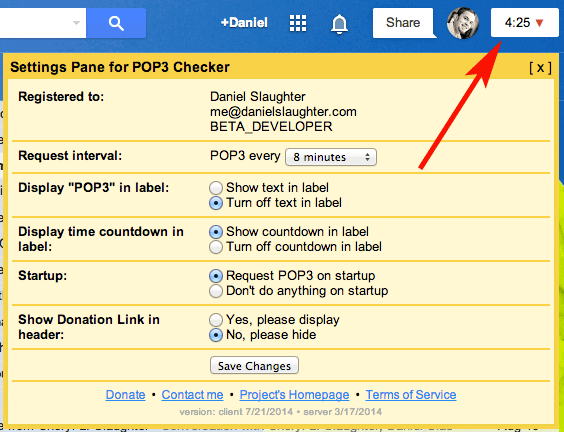
I realize this script does not exist anywhere on the internet, and since I wrote this a while back and have been happily using it for quite some time I’ve decided to make it public. It’s quite a simple script. First, it’ll put a “POP3″ link at the very top right corner of your Gmail page. Second, based on what time interval (in minutes) you select (defaults is 8) it’ll automatically run it for you that often. No more of this waiting for Gmail to check it every 60 minutes stuff! If you do not want it to automatically check just set the time interval to None; this way you’ll at least have the link to manually click at any time.
Donate
Did this script change your life? (I like to think so)
Download
Click here to download this fancy script!
Downloading and/or installing this script signifies your acceptance of the Terms of Service.
If you’re feeling generous and appreciate the work I’ve done, and will continue to do, please consider donating (see above).
Please let me know if you have any other feedback pertaining to this script that may come in handy for future releases.
Installation Directions
| Firefox | You will first need to install an Add-on called Greasemonkey. Once this is installed and you’ve restarted Firefox come back to this page and click the download link to my script. A new type of popup will appear asking you to install it. Click “Install” and then refresh Gmail and you’re all set. To later remove or disable the script you can right-click on the Greasemonkey logo in your status bar (it looks like a monkey’s head), click “Manage User Scripts,” select “Gmail Select POP3 Now” and then either un-check “Enabled” or click “Uninstall.” Also removing the Add-on Greasemonkey will permanently uninstall it. |
| Google Chrome | Simply click my download link in this page. A little popup in chrome will appear at the bottom of your page asking if you want to enable/install it. Once you’ve enabled/installed it then refresh Gmail and you’re all set. To later remove or disable the script you can do so from your Extensions section of Chrome. |
| Opera | I personally have never done this but someone contributed a comment a while back with directions on how to do this. Basically you will need to download this Greasemonkey Emulator for Opera and then rename my script (aagmfunctions.js) to “00.gmfunctions.user.js” (or something along those lines). Then in the Opera configurations you need to add “opera:config#UserPrefs|UserJavaScriptonHTTPS” and check the main checkbox to enable it. |
| Internet Explorer (IE) | There is a Greasemonkey for IE executable available which I have yet to test. Theoretically if it’s using the same Greasemonkey library as Firefox you should be able to install it for IE and then include my script. Further installation directions are not provided and I cannot guarantee this will work. If you do discover this does (or does not) work please let me know. |
| Safari | There is a Mac only GreaseKit for Safari (and a couple other platforms) which will emulate Greasemonkey User Scripts. I have never tried this, but feel free to attempt it and let me know what you find out. |
FAQs
- When I view the Settings/Accounts page and click the “POP3″ link it doesn’t tell me it’s checking my mail, why?
The script runs asynchronously in the background and does not manipulate your view. Thus, you will not see the Settings/Accounts page inform you of the update. However, if you click the “View history” link next to any of your accounts appropriately one minute after clicking the “POP3″ link you’ll see that it truly has updated. - Will your script check more than one of my POP3 accounts?
The script will check every POP3 account you have entered into Gmail. - What is the minimum donation to unlock the additional settings?
The minimum donation is currently set to $1, and the average donation is approximately $4. However, no one likes to be average, right?
Change Log
- Sadly Firefox wasn’t playing nice with the new layout, so I’ve rolled it back to the old version where the POP3 script is displayed next to your name/email address in the top right corner. All cosmetic issues should be fixed now, but if not please let me know.
February 12, 2012
- Fixed a bug I caused from yesterday’s update which prevented Firefox users with the oldish version of Gmail from searching. Sorry! If you are still experiencing issues with this please do let me know.
February 11, 2012
- Another update by Google reimplementing their black-bar (but of course a completely different set of code) broke the placement of the POP3 script. This bug has been fixed. Gmail now has about 6 different templates, and if your script isn’t working properly please do let me know as it is possible it is broken with the new code.
December 13, 2011
- After another update by Google the placement broke, preventing the script from fully loading. This bug has been fixed.
December 9, 2011
- Fixed the misplaced POP3 countdown/text on the new Google header. It should now be located under your name or email.
December 5, 2011
- Required upgrade. If the upgrade doesn’t work in Firefox with Greasemonkey you may have to uninstall the previous version before installing the new one.
- Added support for new Google header.
November 13, 2011
- Fixed a bug where the script would error with missing element “:pn” if the setting for “Refresh” was turned on during start-up in Firefox 8.0.
August 1, 2011
- Fixed a bug introduced by a new version of Gmail which prevented the client side script from loading in Google Apps or non-Google+ Themed templates. This update is not required, but if you’re experiencing problems with your current client version 2/17/2011 loading you’ll want to upgrade. (Thanks Ertugrul)
July 25, 2011
- Fixed a cosmetic text-coloring issue caused by the new Google top-banner strip and other dark themes to better contrast the textual countdown.
February 23, 2011
- Added support to re-check if internet connectivity is lost. You will see the message “Connectivity Lost” and the script with start over at a 3 minute countdown if this happens. This may occur if you put your computer to sleep/hibernate, you enter offline mode, or you actually loose internet or drop wireless. (Thanks Vito E., and Jeff W.)
- Fixed a small cosmetic issue caused by the new Google top-banner strip.
February 17, 2011
- Added support for Gmail’s new top banner strip, but also kept backwards compatibility with Google Apps. This is HIGHLY Beta and may cause cosmetic issues. (Thanks Charles E., Bob, Lachelle, Benjamin N., and Chris)
- Required upgrade from September 25, 2010
November 3, 2010
- Gmail disabled their original user interface, making the script stop POP3ing. I had to change the method it’s using to request for POP3 updates. (Thanks Benjamin N. and Duncan)
October 14, 2010
- Optimized the Refresh setting to be more efficient.
- Fixed an issue where the Refresh setting would “flicker” the compose screen and navigate you to the top of the page. Now refreshes are only done in the background on any of the list pages: Inbox, Sent Mail, All Mail, Trash, etc. (Thanks Nick N. and Adam)
October 12, 2010
- Added full support for all Labs. Some Labs were preventing the POP3 link/counter from appearing or showing correctly; such as “Google Search.” (Thanks John-Paul C., Dave B., Jason S., and Matt V.)
- Fixed a broken link in the Terms of Service.
September 30, 2010
- Changed the mime-type of server requests to text/javascript to prevent warnings in Chrome. (Thanks Dave B.)
September 26, 2010
- Added popup with help information in the event an upgrade cannot be successfully made (Thanks Paul B.)
- Fixed a bug in Chrome caused by today’s earlier release due to a new line character in an alert box which Chrome does not support… Sorry! (Thanks David C., Mark H., and Pootle)
- Added the beta/new/experimental option to Refresh after POP3ing. Please let me know if you run into any issues while using it. (Thanks Daniel M., Dimas, and Halil O. for previously suggesting this feature)
September 25, 2010
- Added HTTPS support to prevent Chrome from throwing SSL Certificate issues (Thanks all who’ve donated as it helped pay for the server certificates)
- Corrected rare cosmetic issues with the header links (Thanks Aaron W.)
- Added Change Log to settings pane
- Fixed a bug implemented by Gmail’s source code which caused the setting’s pane to overtake the window in Firefox
- Required upgrade from September 9, 2010
September 9, 2010
- Added the Settings pane (AWESOME!)
- Request interval (3-60 minutes)
- Display “POP3″ in label
- Display time countdown in label
- Toggle POP3 on startup
- Donation link with toggle
- Reportable errors
- Now works in Google Apps sites! Hooray!
- Runs independently from the normal Gmail site and in as many Apps as you have open
- Displays “POP3 Accounts Missing” if none were found
- Centralizes the code for easy updating without requesting a new download (for most cases)
- Moved POP3 link from the far right to next to “settings”
- Loads instantaneously on slow or fast connections without fail.
- Makes less requests to Gmail to obtain account information.
- Sends out a POP3 request quietly and quickly (less than 1 second).
- Fixed many bugs which were incorrectly gathering the accounts email address needed to POP3 properly.
- Added script stealing preventions to protect the masses; and my reputation (sorry script kiddies).
- Tested stable in Firefox 3.6.9 and Chrome 7.0.503.0 dev
April 3, 2010 [download]
- This is the same exact release as “April 2, 2010 BETA” except I cleaned up the code and removed unnecessary lines of comments. It should now be stable and working properly again.
April 2, 2010 BETA [download]
- Gmail changed their authentication method with making requests to POP3 accounts. I’ve hacked their code once again to update the script accordingly.
- I had to remove the option to use iFrames for the requests as the new method can only be done via the POST method. However, it should still function the same.
February 25, 2010 [download]
- Fixed a very large bug where the number of POP3 accounts you had were miscounted by the script.This should only really affect people with more than 4 accounts, or people with 1. Oh… my silly simple arithmetic skills! (thank you Brad Stinson)
February 24, 2010 [download]
- Fixed a very large bug where if a POP3 account was ever deleted then any future accounts being added would not be checked. This implies any POP3 account deletion ever occurring, not just after my script was installed. If you’ve had problems with previous versions of this script not POP3ing your accounts, this probably will fix it. (thank you Robert/NRHTX).
- Fixed a bug where only accounts marked as “Send email as” would be checked. Now all POP3 accounts will be checked, regardless if you’ve set up Gmail to have the ability to send as themselves (thank you Julien Nephtali).
- Fixed a bug where the “Offline Mode” and “Labs Icon” in the header were not clickable (thank you Jerry Chong and JackieKu).
- Added support for “googlemail.com” accounts, which typically occur for the German, Chinese, and various other languages.
- Rolled back the AJAX cross-domain checking to an injected iFrame.
- Added the variable “useIframe” which will negate the last bullet point, allowing it to use AJAX instead of the iFrames. This should be left to “true” unless you experience issues, then try it as “false.”
February 21, 2010 [download]
- Fixed a huge bug produced by yesterday’s (2/20/2010) update which only let the counter count down once, check your mail, and then never counted again. Anyone who has the 2/20/2010 update should download the new one immediately (thank you emarell).
February 20, 2010
- Fixed a bug where if checkEvery was set to 0 the timer would start counting negative if you clicked the “POP3″ link (thank you Robert/NRHTX).
- Fixed a bug where certain Languages were not supported based on their unique code; such as German (thank you Fred).
- Changed the method of checking POP3 accounts from an injected iFrame to an AJAX call. Reason being that some people were reporting the update working (which uses AJAX), but not the actual checking of the POP3. This issue seems to have been affecting very few people, but hopefully it’s now fixed (thank you Fred and Reed).
February 19, 2010 (a & b)
Sorry! I hate to keep releasing new versions so often, I promise unless something goes drastically wrong this will be the last one for a while.
- Fixed a bug where if checkForUpdates was set to false (defaults to true) it wouldn’t countdown to a POP3 correctly.
- Corrected an issue where when updating a previously installed version of this script it wouldn’t do it successfully.
- Put a sleep buffer on the words “Fetching…” and “Done!” to confirm your POP3 accounts have been checked.
- Fixed a bug where if you had checkEvery set to 0 it would tell you to set it to a number larger than 3. This shouldn’t have happened since 0 should mean for the script to not automatically check.
- Added the variable sendAccountForUpdate (defaults to true) which will send me your account name for contact, update, and bug purposes. I will never share or sell your information in any way, but if something critical happens and the auto update fails this will be my last resort of contact. Otherwise never expect an email from me and the script will continue prompting you for an update if one occurs. If you turn this to false you wont hurt my feelings, but just know you’re limiting yourself from a drastic bug update in the future.
- Fixed a bug where if you had your Gmail settings for the number of conversations on the page changed to anything but three characters (say you selected “25″ instead of “100″) then it would not pull your account settings correctly, thus failing to POP3. (Thanks Chuck for pointing this out!; reason for version ‘b’)
February 18, 2010 (b)
- After today’s release I noticed some gmail images were being referenced from the wrong base url because of the way the script is pulling in your account data in the function findAccountInfo(). This has been corrected.
February 18, 2010 (THIS IS HUGE)
- Fixed a bug where if checkForUpdates was set to false or checkEvery was set to 0 the script would count up instead of have no count.
- Added the showCountdown flag which will allow you to turn the countdown off if it annoys you.
- Corrected a https security issue when checking my server for an update.
- And Probably the greatest improvement of all time: Everything now runs in the background asynchronously and will not navigate to the settings page. Yay! Appreciate this, because you have no idea how deep I had to dig into gmail’s source code to hack out your google identification number and session key to call the “Check mail now” links directly.
- Because everything runs in the background it’ll never tell you that you’re navigating away from a page when composing or replying to a message (which is just awesomeness all over).
- Dropped the default checkEvery time to 8 instead of 10 since it will no longer annoy you when composing a message.
- Added a check to make sure you’re not trying to check faster than every 3 minutes… since I’d LOVE if you didn’t get my script banned by Google.
- I’ve added a “Donate” button to this page (see above) if you’re feeling generous and appreciate the work I’ve done and will continue to do. Don’t feel pressured though!
February 14, 2010 [download]
- Added a count-down to the POP3 link.
- Prevented the script from POP3ing if you’re composing a new message.
February 11, 2010
- Fixed an issue where this wasn’t supported for Google Apps. Thank you Pootle and Ed for catching this!
February 9, 2010
- The bug where either Firefox 3.6 or Gmail’s Greasemonkey support became unstable, preventing this among other scripts to work, has been fixed. This script no longer uses Gmail’s Greasemonkey support.
- Updates were made to have more of an aggressive DOM manipulation.
- The ability for the script to check for updates has been made. It is on by default, but you’re more than welcome to turn it off by setting the checkForUpdates variable to false.
January 15, 2010 [download]
- Script was released in a stable state using Gmail’s Greasemonkey support
February 22nd, 2010 at 1:21 pm
NRHTX, I can report that’s been working 100% with this new rev. I have one pop and using FF3.6 w/win XP.
I have found that it will not play nice with “google account multi-login” from http://www.crappytools.net but this is more important for sure.
February 22nd, 2010 at 7:33 pm
I think I have been posting on the wrong site. I just saw your above reply. I am using English language and the only script is yours. At work I use a MAC and at home a PC. This is what I wrote on other post.
P.S My POP is enabled.
Status: POP is enabled for all mail that has arrived since 6/21/07
_______________________________________________
I have 2 windows open. 1 monitoring my HMailer server and the other Gmail. When I manually click on your script my HMail server logging does not do anything. But if I click on GMails Check mail now I can see my HMail server logging fetching the mail.
I just click on the script POP3 like 4 to 5 times and nothing happens on the HMail Server.
I defaulted back to your Feb 14, 2010 which is working. It is not as beautiful as your Feb 21 update.
Lucky, I saved your Fe 14, 2010 update.
Thank you
Robert
February 22nd, 2010 at 10:15 am
Daniel, I like to report a problem.
I think the script is not working. As of yesterday I was monitoring my HMailer server while clicking on your script and nothing was happening. As of today I am actually confirming that it is not working. I click on the POP3 manually and nothing was happening on my mail server. I was waiting for a email and when I click on the Account settings the last check was done like 44 mins ago. I then clicked on the POP3 manually and nothing. All this was being check while I was looking at my HMail server to see if the pop3 was being submitted. When I click on the Gmail Check Mail now it was working.
February 22nd, 2010 at 1:56 pm
Hello NRHTX, there are some known issues with the German and Chinese language versions of Gmail that I’m working on. Are you using either of those two? Or perhaps another non English (US) language? Another individual, Alex, pointed out a bug where you have to have enabled sending emails from your gmail through all of your POP3 accounts for it to work properly. More information on his response can be found here:
http://www.danielslaughter.com/projects/gmail-pop3-checker-for-greasemonkey/?replytocom=6299#comment-6295
Please let me know if you still cannot get it to work correctly with any other information you can provide to me. I’ll be working on the next version within a day or two, including all of the bug fixes people have thus far reported. It seems like right now as long as you’re using the English (US) language, in Gmail version 2 without other Gmail Greasemonkey plugins, on Firefox 3.6 in either XP or a Mac, and with all your POP3 email accounts set up to send from them it works just fine. Please advise.
February 22nd, 2010 at 8:41 am
GOURGOUS!!!
That makes my gmail 100% better. Thank you so much
February 22nd, 2010 at 7:21 am
Hi Alex,
I just wanted to let you know that you have to enable the capacity to send emails from the pop accounts for your script to work.
I only had 2 out of my 4 accounts that could send emails out and the script was not working…
I then enabled sending emails on all accounts and the script worked.
February 22nd, 2010 at 7:32 am
Huh… I never thought about looking at that. I’ll check into why that’s happening and hopefully will have it working with POP3 emails that haven’t been enabled to send out soon. Thank you for finding this!
February 21st, 2010 at 10:08 pm
Hi Daniel,
It’s great to find your program here. But it can not work on my computer, I am using FF 3.6(Chinese Version)and Greasemonkey (new installed).
After I installed Greasemonkey and your script, nothing happend to my gmail. What should I do?
Alex
February 22nd, 2010 at 5:34 am
Hello Alex, when you log into Google Mail does the URL say “googlemail.com” or “gmail.com” or something else with a different domain extension? I think there may be an issue because it’s referencing the English (US) version of the URLs. I will look into fixing this shortly.
February 21st, 2010 at 8:43 pm
Hi Daniel
I can report the Labs icon has become non-functioning here too. Seems a tad bizarre among bugs.
However I can still open the pageful of Labs options through its link at the top of the Settings page (so I don’t actually *care* much about this particular mini-bug…)
February 22nd, 2010 at 12:42 am
Ah, took a peek at the code, it’s only because line 49′s innerHTML operation accidentally destroys the click events on the icons, so replacing it with .appendChild(document.createTextNode(‘ | ‘)) fixes it. I use the Gears offline mode quite a lot, so it was a little troubling for me.
February 21st, 2010 at 7:31 pm
update – it seems to be working for me now, but I had to reorder my scripts so POP3 Checker was first (it was last before, and worked fine).
February 21st, 2010 at 7:55 pm
Awesome! I’ve been thinking about reordering the links anyways and perhaps I’ll move it to be right after your email address or the labs image for a future release.
February 21st, 2010 at 7:28 pm
Appears to work fine, which is great. By the way, when attaching the new label into the ‘nobr’ it seems to break the click event on the Google Gears sync button and the Labs button on Firefox 3.5.7.
February 21st, 2010 at 7:53 pm
Yes, now that you mention it the Labs button doesn’t work for me either. I’ll check into why and include the fix in the next version. Thank you for reporting this.
February 21st, 2010 at 7:27 pm
2/21 update isn’t working for me (timer isn’t showing now, and pop isn’t getting checked after 15 minutes since install).
February 21st, 2010 at 9:40 am
So far so good with v.2/21/2010; looks like a keeper. Thanks Daniel – smart/quick response much appreciated.
February 21st, 2010 at 8:35 am
The v.2/20/2010 version – it’s a no-go for me. It performs its countdown cycle once, then sits there inactive, displaying its “POP3 Done” message indefinitely.
Because I use MozBackup (highly recommended!!! see http://download.cnet.com/MozBackup/3000-2242_4-10260383.html) twice a week and happened to have done a backup yesterday, I was able to revert to v.2/19/2010b very easily. That version works fine for me.
However for other users I suggest posting previous versions of the script here.
Thanks for working on the script so conscientiously.
February 21st, 2010 at 9:10 am
Hello emarell,
Thank you so much for catching that! By removing the call to the timerPopMail() function due to it’s bug when checkEvery was set to 0 I created a new issue (and a BIG one). Today’s release 2/21/2010 has been fully tested and produces the desired results no matter your settings. Please let me know if you run across anything else!
February 20th, 2010 at 1:53 pm
Daniel, Question. When I set the var checkEvery = 8 to 0. The POP3 stays steady but when I click on it why does the clock start counting.
Example [POP3 in 0:0-0] then it goes to 60 secs and starts over.
Thank you
Robert
February 20th, 2010 at 8:01 pm
Hello Robert,
I’ve fixed the problem you were seeing and do expect to see a version here shortly. Please let me know if you run into any other problems.
February 20th, 2010 at 3:17 am
Hello Daniel!
Yeah I am using the newest GMAIL version…
Also the latest greasemonkey and FF version…
I tested the script by inserting different
alerts but it seems that all important code segments are called properly…BUT
none of my 3 POP accounts are requested
(by looking at the view history)
I disabled all lab applications…
Really wonder why it doesn’t work…
…must be a tiny problem I guess…
February 20th, 2010 at 6:58 pm
The same to me. Also using newest GMAIL version on FireFox 3.6.
February 20th, 2010 at 8:05 pm
Hello Fred and Reed,
I cannot seem to reproduce anything that’s limiting the script from checking my POP3 accounts. Are you using the “English (US)” language, or another one? Does it work in “English (US)” and just not the others (such as “German”)? Have you changed any of the default settings in my script, and if so what are they?
Is anyone else noticing the script not checking their POP3 accounts and could be of assistance?
February 20th, 2010 at 8:41 pm
Hello Fred and Reed,
I’ve made some changes to tonight’s release of the code which may solve the problems you were seeing. Could you install the newest version (2/20/2010) and let me know if that fixes it?
February 21st, 2010 at 7:47 pm
Thank you for your reply!
I have updated to the latest version(2/21/2010), But the problem still exists.
After counts down,but my POP accounts are not really checked(by looking at the view history).
February 21st, 2010 at 10:17 pm
Sorry, I reinstall the latest version(2/21/2010), now It Work fine.
February 19th, 2010 at 2:51 pm
How do I edit the script in chrome?
February 19th, 2010 at 8:49 pm
Hello Chris,
As far as I know the script will not be compatible in Chrome because it’s using Greasemonkey’s proprietary functions to do cross-domain AJAX calls. I’m in the process of either making this script, or another script, compatible for Chrome. I too have been wanting to switch to that browser for quite some time but have been on a Mac. Thankfully they just released support for extensions and embedded scripts.
If you’re just wanting to know WHERE the scripts are stored, I know on a Mac mine get stored in a folder such as:
/Users/[username]/Library/Application Support/Google/Chrome/Default/Extensions/[random-hash]/1.0/script.js
I’d imagine on a Windows machine it cannot be too far off (probably /Program Files/Application Data/…).
February 19th, 2010 at 2:09 pm
Well things are not working for me… =)
After changing to English pop3 checker
appears and counts down… but my 3 pop
accounts are not really checked… (nothing happens in viewHistory)… are there any possibilities to output the errors…??? Which lines (by name) do I have to comment out in the current script?
I am running the latest FF 3.6 on Win 7 Prof.
February 19th, 2010 at 8:43 pm
Hello Fred,
If there are any errors you should just see them. Just to confirm, are you using the newest version of Gmail (version 2) and not version 1 or the HTML version? The older versions may not work properly.
February 19th, 2010 at 11:42 am
Thanks for that great script…
There is just one problem:
I use the German verion of the
Gmail client and POP3 checker
is invisible…
When I change the language
to English POP3 checker appears…
and works great
Can you tell me which part
of the script has to be changed
to use it in German versions too?
Fred
February 19th, 2010 at 12:02 pm
Hello Fred,
I never even thought about looking at other languages, so thank you for noticing this. It appears some languages in the Gmail client put “Google Mail” in the top left of the screen instead of “Google” or “Mail” like most other views do. I’ve updated my version and will include that in the next public release as soon as I update a couple other things. Until then, feel free to go ahead and replace line 30 with this:
if (el && el.length && (el[0].innerHTML == ‘Gmail’ || el[0].innerHTML == ‘Mail’ || el[0].innerHTML == ‘Google Mail’)) {
Please let me know if you have any further questions.
Daniel
February 19th, 2010 at 7:41 am
Works perfectly! Thanks for the quick turnaround.
Chuck
February 18th, 2010 at 8:58 pm
Daniel,
Excellent work. Thank you for contributing this.
I needed to tweak the script a little to get things to work. The search for the Google identification hash wasn’t working because the search string, ‘”/mail”,100,”‘, includes the setting for the number of conversations on the page. Mine was set to 25. Once I reset it to 100 the script started working perfectly.
February 18th, 2010 at 9:38 pm
Hello Chuck,
Thank you for noticing that! I had just released version 2/19/10 moments before getting your email so I quickly patched it for the already second release today. I wasn’t exactly sure what that setting was for (the 100) and just assumed it would always be three characters. That’s what I get for assuming. Feel free to download the new version: 2/19/10b.
Daniel
February 18th, 2010 at 4:06 pm
Hello Daniel,
The script worked great the last few days. After updating to the new version, the script seems to work (link appears, countdown). However, it is no longer able to access my POP account. I press your link and nothing happens. I press the Google download link and that works fine so it isn’t my email config. I am running on Firefox version 3.5.8.
February 18th, 2010 at 5:28 pm
Hello LD Miller,
The script should check your POP3 accounts just fine. Previously it would navigate to the Settings/Accounts page for you and click the links, however now everything is done within the background. This means it will not navigate for you, nor will it update your client page telling you it’s checking. You will not see the “Check mail now…” link on the Settings/Accounts page change, but if you click the “View history” link next to your POP3 accounts you will see they have been checked (usually takes about a minute after clicking the greasemonkey’s POP3 link). If there is something else that’s happening please let me know and I’ll look into it. If it helps, currently I’m running Firefox 3.6… so possibly your version is having a conflict.
Daniel Slaughter
February 18th, 2010 at 1:10 pm
Working perfectly now, thank you Daniel, wish I knew how you did it.
February 18th, 2010 at 1:50 pm
Hey Andy,
I did it the same way I go everything: magic. Haha… no-no. I found the links gmail makes the requests through to check your account, but those links contained your gmail identification number and your session authorization number. There wasn’t a good way of getting access to those two things so I had to hack around gmail’s source code to locate both of them from other sources, loop over your POP3 accounts, and set up little triggers to re-check them when the time runs out.
As far as the image issue you pointed out that was happening because the script looks at the “simple HTML version” of Gmail to gather your session authorization number, because that’s the only place it’s displayed in clear text. But when I make that request google by default sets your basepath as the HTML version, and the images are not located in the same spots. So I just request back to the “standard 2 version” which sets that all back to how it should be.
Hopefully that explanation is helpful, or at least interesting.
Daniel Slaughter
February 18th, 2010 at 11:44 am
Thank you emarell! I’m glad you enjoy it.
February 18th, 2010 at 10:31 am
Yes, Daniel, you have solved the mystery for me. I admire Google. But as with any large conglomeration of products/features/personnel, despite a slew of help screens and forums, the workings of one or another attention-riveting aspect of GoogleWorld will occasionally manage to escape the grasp of semi-intelligent users such as myself! Luckily we have you.
And BTW your newest script is proving – as the post-installation hours go by – to be just perfect.
February 18th, 2010 at 9:54 am
Daniel, I noticed that when I am in Accounts and Import and then I click on your POP3 nothing happens. In other words the Check mail now stays still. When I manually click on it. It should show (Checking mail…) The reason I am reporting it is because I went to my wife gmail account and she hardly gets mail. I notice the script not working. waiting for the 8 mins and it stood still. I also tried manually clicking on the POP3 and it dd the same it stood still.
Thank you
NRH TX
February 18th, 2010 at 11:42 am
Hello NRH TX,
The script has been updated to work Asynchronously in the background. This means the page will never jump you to the Accounts/Settings page because everything is done sneaky-sneaky in the background. The “Checking mail…” will also never show up on your end because the request isn’t actually made from your active browser. However, if you’d like to see that the script is working, when you click POP3 in the top right wait about 1 minute, then go over to the Accounts/Settings page and click the “View history” link next to your POP3 account. You’ll see that POP3 updates are being made in your desired time interval, but you’ll just never see that actively happen on the Accounts page. The Asynchronous updates are nice because it wont navigate you away from your compose screen, yet it’ll still make the POP3 check itself when writing a message. Hopefully that makes sense!
Daniel
February 18th, 2010 at 6:44 am
Kudos on v.2/18/2010b – it’s really good. So nice you have gotten rid of the security ‘red alert’ I was seeing in my Firefox URL bar when I opened a Gmail inbox.
Maybe you know the answer to a question on a related matter: does Gmail do its own, built-in POP3 checking all the while I’m logged out of the account? Or does it wait until login to begin fetching?
February 18th, 2010 at 7:50 am
Hello emarell,
Gmail will automatically POP3 your accounts periodically while you’re not logged in. Their algorithm is to POP3 more often if you’re receiving emails more often. So if you have an account where you get 1-2 emails a day they’ll only POP3 it every hour or so. But if you have an account where you get quite a few every hour they may POP3 as fast as every few minutes. Typically though I’ve noticed it happens once about every hour. The same thing happens if you’re not using this script and you are logged into Gmail at the time… which is annoying, hence my script.
Hopefully that helps!
Daniel
February 18th, 2010 at 5:49 am
There are some new anomalies to report, not sure if you’re seeing them or not but you can’t miss them on my computer (WinXP Pro, FF 3.6, many add-on and scripts…).
In an open email the area to the left of the senders name the star graphic is messed up and there’s a new chunk of graphic there. In compose the menu bar for text editing is gone, chat window graphics all gone bad. see this link for screen shots. http://picasaweb.google.com/aelumley99/DropBox?authkey=Gv1sRgCPDMs7Gb7MuIHQ&feat=directlink
Otherwise seems to be working
February 17th, 2010 at 10:08 pm
I’ve updated the script to version 2/18/10. It’ll now fix all previous issues and communicate with gmail in the background asynchronously. That basically means it wont change the page you’re on, and you really wont see anything happening other than the timer hits 0 and restarts. Yup, it’s now just magic. Enjoy!
February 17th, 2010 at 6:38 am
Also just discovered that if you’re composing a new email when the timer goes off it will want to leave that screen so you get a “would you like to abandon….” message. I changed checkForUpdates variable to false but it’s still counts down and still interrupts the not yet saved draft.
I note now that the Loading…. now behaves normally, no idea if the two are connected.
If I’m not editing the script correctly please tell me what I’m doing wrong and I’ll bet it needs to be compiled and I don’t know how to do that.
That line reads: http*://mail.google.com/*
// ==/UserScript==
var checkEvery = 10; // number in minutes
var checkForUpdates = false;
Also tried setting the timer to 0 but then it counts up! I’d be very happy to turn the timer off if you can’t fix the interrupt problem.
February 17th, 2010 at 1:45 pm
Hello Andy,
I’ll have a fix in place so the timer will not count up, and it’ll turn off if the checkEvery is set to 0. That was a bug that was accidentally added in the last (2/14/10) release. I’m in the process of trying to get the script to run in the background to avoid it from navigating through the pages, but as of right now manually hacking through the gmail code presents this as not so promising. Gmail hashes a couple keys it passes around to authenticate you’re clicking the link from your accounts page. And as of right now, I cannot seem to duplicate that hash. I’ll keep working on it, but it’ll be some time.
Daniel Slaughter
February 17th, 2010 at 5:43 am
First a huge thank you, really needed this script and do not have the skill set required to make my own. One thing though is that I’ve got the “Loading…” message at the top all the time, is that what’s happening for others? And otherwise seems to be working as advertised.
February 17th, 2010 at 4:12 am
Problem with Compose and Reply.
If I’m composing or replying to a message, a pop-up appears “Your draft has been modified. Abandon changes?” (for reply). If I’m typing furiously and hit return, I lose my edits. Can the script be made to click “Save Now” in those screens?
Thanks for this great add-on!
February 17th, 2010 at 1:46 pm
Hello Pootle, I hope to have a solution to this soon. Trust me, it bugs me too.
February 16th, 2010 at 6:43 am
Great work, Daniel. Love the script!
One small thing though: I prefer to set the timer to 0 and check things manually, but that causes the countdown to go whacky.
February 16th, 2010 at 11:11 am
Thank you for noticing this. I’ll make an update shortly which will not include the timer if it is set to 0.
February 15th, 2010 at 5:53 am
Daniel – Great script… it’s the only one I can find that works w/ FF 3.6!
One issue I thought you may want to know about; when I have your script enabled, if I press the Settings link from the main Gmail page, the settings page opens in a new tab (as opposed to opening in same tab when script is disabled). Minor annoyance, but maybe something you can work out if you do another update.
February 14th, 2010 at 7:45 pm
Your Valentines day update, ROCKS.
Thank you
February 14th, 2010 at 5:25 pm
I’ve updated the script to have a countdown to the next check. It also will not check POP3 if you are on the compose screen. I do not think, however, it will matter if you’re replying to a message since that’s not the same hash code. I’m not sure how to check against that.
February 12th, 2010 at 10:31 am
You’re welcome, but you should remove my first and second messages and keep the final code!
February 12th, 2010 at 8:21 am
Daniel, I like to report a small bug. When you 1st log on to Gmail the script automacally tries to get the pop3. The problem is that once in awhile it gets stuck on Accounts and Import. Now when I refresh the page and manually click Check POP3 Now it works perfect. It also works perfect every ten minutes.
The problem I have is only when you 1st log on to Gmail it tries to grab the POP3 at the 1st logon but he gets stuck on (Accounts and Import). Can this be disabled? or Can I modify it not to check upon logging in the 1st time.
Thanks, you script rocks.
February 12th, 2010 at 10:28 am
Hi Robert, I’ll try and incorporate a fix for that to ensure it doesn’t get stuck on that page shortly. Expect an update within the next couple days.
February 12th, 2010 at 4:40 am
In fact it’s more math.floor() than math.round()
Another thing, you can fix the “You’re trying to navigate away from this page, are you sure you want to do this?†problem.
Just check that the location hash is not “#compose”
function timerPopMail() {
// is it time to POP3 yet?
var d = new Date();
var msecEllapsed = (Date.UTC(d.getYear(),d.getMonth(),d.getDate(),d.getHours(),d.getMinutes(),d.getSeconds())) – milliseconds;
if (checkEvery > 0 && msecEllapsed > checkEvery*60000 && top.location.hash != ‘#compose’) {
fetchPopMail();
label.innerHTML = ‘POP3 just checked’;
}
else {
if( Math.floor(msecEllapsed/60000) > 0 )
label.innerHTML = ‘POP3 Checked ‘+Math.floor(msecEllapsed/60000)+’min ago’;
else
label.innerHTML = ‘POP3 Checked ‘+Math.floor(msecEllapsed/1000)+’s ago’;
}
// do some recursion in 15 seconds to see if it is time to automatically POP3 yet
window.setTimeout(function() {
timerPopMail();
},15000);
};
February 12th, 2010 at 10:29 am
Thanks PM! I’ll add your suggestions to the master source cord shortly. Expect an update within the next few days.
February 12th, 2010 at 2:35 am
Oups better with a Math.round()
if( Math.round(msecEllapsed/60000) > 0 )
label.innerHTML = ‘POP3 Checked ‘+Math.round(msecEllapsed/60000)+’min ago’;
else
label.innerHTML = ‘POP3 Checked ‘+Math.round(msecEllapsed/1000)+’s ago’;
February 12th, 2010 at 2:21 am
I tweeked your script to display when last check was performed:
[code]function timerPopMail() {
// is it time to POP3 yet?
var d = new Date();
var msecEllapsed = (Date.UTC(d.getYear(),d.getMonth(),d.getDate(),d.getHours(),d.getMinutes(),d.getSeconds())) - milliseconds;
if (checkEvery > 0 && msecEllapsed > checkEvery*60000) {
fetchPopMail();
label.innerHTML = 'POP3 just checked';
}
else {
if( msecEllapsed/60000 > 0 )
label.innerHTML = 'POP3 Checked '+msecEllapsed/60000+'min ago';
else
label.innerHTML = 'POP3 Checked '+msecEllapsed/1000+'s ago';
}
// do some recursion in 15 seconds to see if it is time to automatically POP3 yet
window.setTimeout(function() {
timerPopMail();
},15000);
};[/code]
February 10th, 2010 at 2:57 pm
Thanks for this. I use Google Apps which may explain why my “innerHTML” tag was “Mail” & not “Gmail”. I changed L19 & now it works fine:
if (el && el.length && (el[0].innerHTML == ‘Gmail’ || el[0].innerHTML == ‘Mail’)) {
February 11th, 2010 at 7:12 am
Ed, I’ve updated the master source code to include your check for ‘Gmail’ or ‘Mail’ depending where they’re at. Thank you for catching this!
February 10th, 2010 at 5:33 am
Fixed it! I changed line 19 from:
if (el && el.length && el[0].innerHTML == ‘Gmail’) {
to
if (el && el.length && el[0].innerHTML == ‘Mail’) {
I noticed that my GMail page doesn’t have the string “Gmail” anywhere, it has “Mail”
February 10th, 2010 at 5:00 am
The 2/9/2010 update is not working for me. I get no clickable link in Gmail, nor error message displayed. I am using Firefox 3.6, the only add-on currently installed is Greasemonkey and this script, and no themes. I have the GMail Classic theme, no Labs. I am in the UK.
Is there any way to see error messages?
Many thanks
February 11th, 2010 at 7:13 am
Pootle, for future reference if you comment out the following lines you’ll actually get a javascript error:
Line 60, Lines 73-78.
February 10th, 2010 at 2:56 am
Not working for me
It’s enabled and GMail is correctly “include”d. Is there any way to get some debug information?
I’m using the latest Greasemonkey. This is the only Greasemonkey script. I have the following add-ons:
Adblock Plus
Add To Search Bar
Roboform toolbar
Greasemonkey
Microsft .NET framework assistant
Minimize to Tray (revived)
OPML Support
Personal Menu
Sage
Update Notifier
February 9th, 2010 at 8:34 pm
Rock on.
This one works.
Thank you so much.
I will provide your site to the userscripts.org in replacement of those POP3 that are not working.
Thank you
February 9th, 2010 at 3:16 pm
I’ve made some drastic updates to the script. It should now work like a charm:
http://www.danielslaughter.com/projects/gmail-pop3-checker-for-greasemonkey/
You may need to uninstall the old one, since the title of it has slightly changed. From now on it’ll prompt you if I’ve made any updates so you wont have to come here to download it ever again.
February 3rd, 2010 at 3:51 pm
Daniel,
Thank you for replying. I thought I was going crazy. Now makes sense that it might be GreaseMonkey.
Thank you
NRH TX
January 30th, 2010 at 9:01 am
Wonderful Script.
I tried your script yesterday and today in a different computer. But when the scripts goes to the Accounts and Import page it does not click on Check mail now. It just hangs on Accounts and Import page. Great script I am using Firefox 3.6. I was using this script http://userscripts.org/scripts/show/51516 but since FF 3.6 the scripts does not work.
Thank you
NRHTX
February 2nd, 2010 at 6:13 am
This is a problem with the Greasemoneky support Gmail offers. They are looking into the issue, and it’s wider spread than just my script. This has happened once before, and it took them about 2 weeks to repair their source code. As of right now you may see an error along the lines of “…something… element ‘t’ is undefined” which is due to their source. From what I’ve seen this hasn’t been working since this past Friday. Hopefully they’ll have it fixed soon! If not I’ll look into a more aggressive solution and keep you updated.
January 25th, 2010 at 12:46 pm
Ignore the above,compiled it and installed thanks
January 25th, 2010 at 12:43 pm
How do you get this to install / run?
January 24th, 2010 at 10:28 am
No problem, I’m glad I can make your POP3ing easier.
January 20th, 2010 at 9:47 am
I have been trying to automate this process for a long time without success. Thank you so much:D