GMail POP3 Checker for Greasemonkey and Chrome (Automatically!)

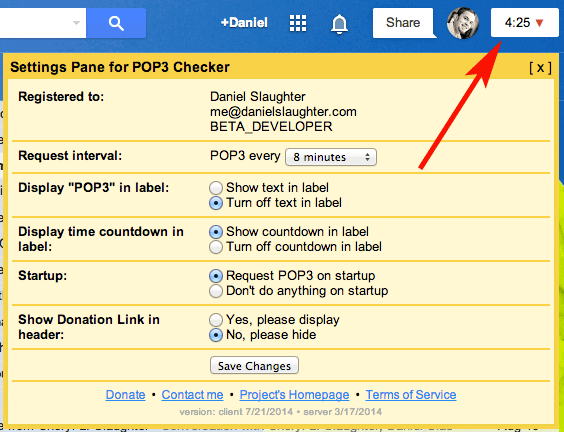
GMail POP3 Checker Screenshot

Introduction

I realize this script does not exist anywhere on the internet, and since I wrote this a while back and have been happily using it for quite some time I’ve decided to make it public. It’s quite a simple script. First, it’ll put a “POP3″ link at the very top right corner of your Gmail page. Second, based on what time interval (in minutes) you select (defaults is 8) it’ll automatically run it for you that often. No more of this waiting for Gmail to check it every 60 minutes stuff! If you do not want it to automatically check just set the time interval to None; this way you’ll at least have the link to manually click at any time.

Donate

Did this script change your life? (I like to think so)

Download

Click here to download this fancy script!
Downloading and/or installing this script signifies your acceptance of the Terms of Service.

If you’re feeling generous and appreciate the work I’ve done, and will continue to do, please consider donating (see above).

Please let me know if you have any other feedback pertaining to this script that may come in handy for future releases.

Installation Directions

Firefox You will first need to install an Add-on called Greasemonkey. Once this is installed and you’ve restarted Firefox come back to this page and click the download link to my script. A new type of popup will appear asking you to install it. Click “Install” and then refresh Gmail and you’re all set. To later remove or disable the script you can right-click on the Greasemonkey logo in your status bar (it looks like a monkey’s head), click “Manage User Scripts,” select “Gmail Select POP3 Now” and then either un-check “Enabled” or click “Uninstall.” Also removing the Add-on Greasemonkey will permanently uninstall it.
Google Chrome You will first need to install an Add-on called Tampermonkey. Once this is installed and come back to this page and click the download link to my script. Simply click my download link in this page. A new type of popup will appear asking you to install it. Click “Install” and then refresh Gmail and you’re all set. To later remove or disable the script you can do so from your Extensions section of Chrome or through Tampermonkey’s settings.
Opera – beta I personally have never done this but someone contributed a comment a while back with directions on how to do this. Basically you will need to download this Greasemonkey Emulator for Opera and then rename my script (aagmfunctions.js) to “00.gmfunctions.user.js” (or something along those lines). Then in the Opera configurations you need to add “opera:config#UserPrefs|UserJavaScriptonHTTPS” and check the main checkbox to enable it.
Internet Explorer (IE) – beta There is a Greasemonkey for IE executable available which I have yet to test. Theoretically if it’s using the same Greasemonkey library as Firefox you should be able to install it for IE and then include my script. Further installation directions are not provided and I cannot guarantee this will work. If you do discover this does (or does not) work please let me know.
Safari – beta There is a Mac only GreaseKit for Safari (and a couple other platforms) which will emulate Greasemonkey User Scripts. I have never tried this, but feel free to attempt it and let me know what you find out. There is another userscript emulator called Ninjakit you could try if that doesn’t work.

FAQs

  • When I view the Settings/Accounts page and click the “POP3″ link it doesn’t tell me it’s checking my mail, why?
    The script runs asynchronously in the background and does not manipulate your view. Thus, you will not see the Settings/Accounts page inform you of the update. However, if you click the “View history” link next to any of your accounts appropriately one minute after clicking the “POP3″ link you’ll see that it truly has updated.
  • Will your script check more than one of my POP3 accounts?
    The script will check every POP3 account you have entered into Gmail.
  • What is the minimum donation to unlock the additional settings?
    The minimum donation is currently set to $1, and the average donation is approximately $4. However, no one likes to be average, right? :)

Change Log

April 12, 2013

  • Applied a patch that was causing Chrome version 27.X+ to not load the script correctly. This was due to a recent announcement by Google of replacing WebKit, causing the XHR requests of the script to get wacky. Should be all fixed now, and backwards compatible with older version of Chrome and/or recent builds of Firefox. (Thanks Jonathan, Kyle)

February 15, 2012

  • Sadly Firefox wasn’t playing nice with the new layout, so I’ve rolled it back to the old version where the POP3 script is displayed next to your name/email address in the top right corner. All cosmetic issues should be fixed now, but if not please let me know.

February 12, 2012

  • Fixed a bug I caused from yesterday’s update which prevented Firefox users with the oldish version of Gmail from searching. Sorry! If you are still experiencing issues with this please do let me know.

February 11, 2012

  • Another update by Google reimplementing their black-bar (but of course a completely different set of code) broke the placement of the POP3 script. This bug has been fixed. Gmail now has about 6 different templates, and if your script isn’t working properly please do let me know as it is possible it is broken with the new code.

December 13, 2011

  • After another update by Google the placement broke, preventing the script from fully loading. This bug has been fixed.

December 9, 2011

  • Fixed the misplaced POP3 countdown/text on the new Google header. It should now be located under your name or email.

December 5, 2011

  • Required upgrade. If the upgrade doesn’t work in Firefox with Greasemonkey you may have to uninstall the previous version before installing the new one.
  • Added support for new Google header.

November 13, 2011

  • Fixed a bug where the script would error with missing element “:pn” if the setting for “Refresh” was turned on during start-up in Firefox 8.0.

August 1, 2011

  • Fixed a bug introduced by a new version of Gmail which prevented the client side script from loading in Google Apps or non-Google+ Themed templates. This update is not required, but if you’re experiencing problems with your current client version 2/17/2011 loading you’ll want to upgrade. (Thanks Ertugrul)

July 25, 2011

  • Fixed a cosmetic text-coloring issue caused by the new Google top-banner strip and other dark themes to better contrast the textual countdown.

February 23, 2011

  • Added support to re-check if internet connectivity is lost. You will see the message “Connectivity Lost” and the script with start over at a 3 minute countdown if this happens. This may occur if you put your computer to sleep/hibernate, you enter offline mode, or you actually loose internet or drop wireless. (Thanks Vito E., and Jeff W.)
  • Fixed a small cosmetic issue caused by the new Google top-banner strip.

February 17, 2011

  • Added support for Gmail’s new top banner strip, but also kept backwards compatibility with Google Apps. This is HIGHLY Beta and may cause cosmetic issues. (Thanks Charles E., Bob, Lachelle, Benjamin N., and Chris)
  • Required upgrade from September 25, 2010

November 3, 2010

  • Gmail disabled their original user interface, making the script stop POP3ing. I had to change the method it’s using to request for POP3 updates. (Thanks Benjamin N. and Duncan)

October 14, 2010

  • Optimized the Refresh setting to be more efficient.
  • Fixed an issue where the Refresh setting would “flicker” the compose screen and navigate you to the top of the page. Now refreshes are only done in the background on any of the list pages: Inbox, Sent Mail, All Mail, Trash, etc. (Thanks Nick N. and Adam)

October 12, 2010

  • Added full support for all Labs. Some Labs were preventing the POP3 link/counter from appearing or showing correctly; such as “Google Search.” (Thanks John-Paul C., Dave B., Jason S., and Matt V.)
  • Fixed a broken link in the Terms of Service.

September 30, 2010

  • Changed the mime-type of server requests to text/javascript to prevent warnings in Chrome. (Thanks Dave B.)

September 26, 2010

  • Added popup with help information in the event an upgrade cannot be successfully made (Thanks Paul B.)
  • Fixed a bug in Chrome caused by today’s earlier release due to a new line character in an alert box which Chrome does not support… Sorry! (Thanks David C., Mark H., and Pootle)
  • Added the beta/new/experimental option to Refresh after POP3ing. Please let me know if you run into any issues while using it. (Thanks Daniel M., Dimas, and Halil O. for previously suggesting this feature)

September 25, 2010

  • Added HTTPS support to prevent Chrome from throwing SSL Certificate issues (Thanks all who’ve donated as it helped pay for the server certificates)
  • Corrected rare cosmetic issues with the header links (Thanks Aaron W.)
  • Added Change Log to settings pane
  • Fixed a bug implemented by Gmail’s source code which caused the setting’s pane to overtake the window in Firefox
  • Required upgrade from September 9, 2010

September 9, 2010

  • Added the Settings pane (AWESOME!)
    • Request interval (3-60 minutes)
    • Display “POP3″ in label
    • Display time countdown in label
    • Toggle POP3 on startup
    • Donation link with toggle
    • Reportable errors
  • Now works in Google Apps sites! Hooray!
    • Runs independently from the normal Gmail site and in as many Apps as you have open
  • Displays “POP3 Accounts Missing” if none were found
  • Centralizes the code for easy updating without requesting a new download (for most cases)
  • Moved POP3 link from the far right to next to “settings”
  • Loads instantaneously on slow or fast connections without fail.
  • Makes less requests to Gmail to obtain account information.
  • Sends out a POP3 request quietly and quickly (less than 1 second).
  • Fixed many bugs which were incorrectly gathering the accounts email address needed to POP3 properly.
  • Added script stealing preventions to protect the masses; and my reputation (sorry script kiddies).
  • Tested stable in Firefox 3.6.9 and Chrome 7.0.503.0 dev

April 3, 2010 [download]

  • This is the same exact release as “April 2, 2010 BETA” except I cleaned up the code and removed unnecessary lines of comments. It should now be stable and working properly again.

April 2, 2010 BETA [download]

  • Gmail changed their authentication method with making requests to POP3 accounts. I’ve hacked their code once again to update the script accordingly.
  • I had to remove the option to use iFrames for the requests as the new method can only be done via the POST method. However, it should still function the same.

February 25, 2010 [download]

  • Fixed a very large bug where the number of POP3 accounts you had were miscounted by the script.This should only really affect people with more than 4 accounts, or people with 1. Oh… my silly simple arithmetic skills! (thank you Brad Stinson)

February 24, 2010 [download]

  • Fixed a very large bug where if a POP3 account was ever deleted then any future accounts being added would not be checked. This implies any POP3 account deletion ever occurring, not just after my script was installed. If you’ve had problems with previous versions of this script not POP3ing your accounts, this probably will fix it. (thank you Robert/NRHTX).
  • Fixed a bug where only accounts marked as “Send email as” would be checked. Now all POP3 accounts will be checked, regardless if you’ve set up Gmail to have the ability to send as themselves (thank you Julien Nephtali).
  • Fixed a bug where the “Offline Mode” and “Labs Icon” in the header were not clickable (thank you Jerry Chong and JackieKu).
  • Added support for “googlemail.com” accounts, which typically occur for the German, Chinese, and various other languages.
  • Rolled back the AJAX cross-domain checking to an injected iFrame.
  • Added the variable “useIframe” which will negate the last bullet point, allowing it to use AJAX instead of the iFrames. This should be left to “true” unless you experience issues, then try it as “false.”

February 21, 2010 [download]

  • Fixed a huge bug produced by yesterday’s (2/20/2010) update which only let the counter count down once, check your mail, and then never counted again. Anyone who has the 2/20/2010 update should download the new one immediately (thank you emarell).

February 20, 2010

  • Fixed a bug where if checkEvery was set to 0 the timer would start counting negative if you clicked the “POP3″ link (thank you Robert/NRHTX).
  • Fixed a bug where certain Languages were not supported based on their unique code; such as German (thank you Fred).
  • Changed the method of checking POP3 accounts from an injected iFrame to an AJAX call. Reason being that some people were reporting the update working (which uses AJAX), but not the actual checking of the POP3. This issue seems to have been affecting very few people, but hopefully it’s now fixed (thank you Fred and Reed).

February 19, 2010 (a & b)


Sorry! I hate to keep releasing new versions so often, I promise unless something goes drastically wrong this will be the last one for a while.

  • Fixed a bug where if checkForUpdates was set to false (defaults to true) it wouldn’t countdown to a POP3 correctly.
  • Corrected an issue where when updating a previously installed version of this script it wouldn’t do it successfully.
  • Put a sleep buffer on the words “Fetching…” and “Done!” to confirm your POP3 accounts have been checked.
  • Fixed a bug where if you had checkEvery set to 0 it would tell you to set it to a number larger than 3. This shouldn’t have happened since 0 should mean for the script to not automatically check.
  • Added the variable sendAccountForUpdate (defaults to true) which will send me your account name for contact, update, and bug purposes. I will never share or sell your information in any way, but if something critical happens and the auto update fails this will be my last resort of contact. Otherwise never expect an email from me and the script will continue prompting you for an update if one occurs. If you turn this to false you wont hurt my feelings, but just know you’re limiting yourself from a drastic bug update in the future.
  • Fixed a bug where if you had your Gmail settings for the number of conversations on the page changed to anything but three characters (say you selected “25″ instead of “100″) then it would not pull your account settings correctly, thus failing to POP3. (Thanks Chuck for pointing this out!; reason for version ‘b’)

February 18, 2010 (b)

  • After today’s release I noticed some gmail images were being referenced from the wrong base url because of the way the script is pulling in your account data in the function findAccountInfo(). This has been corrected.

February 18, 2010 (THIS IS HUGE)


  • Fixed a bug where if checkForUpdates was set to false or checkEvery was set to 0 the script would count up instead of have no count.
  • Added the showCountdown flag which will allow you to turn the countdown off if it annoys you.
  • Corrected a https security issue when checking my server for an update.
  • And Probably the greatest improvement of all time: Everything now runs in the background asynchronously and will not navigate to the settings page. Yay! Appreciate this, because you have no idea how deep I had to dig into gmail’s source code to hack out your google identification number and session key to call the “Check mail now” links directly. :D
  • Because everything runs in the background it’ll never tell you that you’re navigating away from a page when composing or replying to a message (which is just awesomeness all over).
  • Dropped the default checkEvery time to 8 instead of 10 since it will no longer annoy you when composing a message.
  • Added a check to make sure you’re not trying to check faster than every 3 minutes… since I’d LOVE if you didn’t get my script banned by Google.
  • I’ve added a “Donate” button to this page (see above) if you’re feeling generous and appreciate the work I’ve done and will continue to do. Don’t feel pressured though!

February 14, 2010 [download]


  • Added a count-down to the POP3 link.
  • Prevented the script from POP3ing if you’re composing a new message.

February 11, 2010

  • Fixed an issue where this wasn’t supported for Google Apps. Thank you Pootle and Ed for catching this!

February 9, 2010

  • The bug where either Firefox 3.6 or Gmail’s Greasemonkey support became unstable, preventing this among other scripts to work, has been fixed. This script no longer uses Gmail’s Greasemonkey support.
  • Updates were made to have more of an aggressive DOM manipulation.
  • The ability for the script to check for updates has been made. It is on by default, but you’re more than welcome to turn it off by setting the checkForUpdates variable to false.

January 15, 2010 [download]


  • Script was released in a stable state using Gmail’s Greasemonkey support

654 Responses to “GMail POP3 Checker for Greasemonkey and Chrome (Automatically!)”

  • Candice Says:

    Sorry, I don’t get it, I installed Tampermonkey, installed the script, restarted Chrome but don’t see anything new… this is my inbox: http://imm.io/15xBi I’ve clicked on all the down arrows but don’t see anything. Where do I see/access the settings?? I don’t have anything between my Search button icon and my notifications.

  • vincent Says:

    Do I have to open the gmail web page to keep the script running?

    • Daniel Slaughter Says:

      Hello Vincent – You will need to keep Gmail open with the script running in order for it to POP3 more frequently.

    • geraint owen Says:

      Daniel,

      I have the extension installed but I don’t see any kind of control panel where I can adjust settings. In the top right of gmail browser page – chrome – there is a downward facing arrow and a counter. Clicking here makes it go check mail now and the counter then reverts to counting down from 10 minutes. I cant find anything in any of the settings menus. Am I missing something very obvious?

      • Daniel Slaughter Says:

        Hello geraint – You’re correct in that the timmer causes gmail to POP3 all of your accounts when you click it. The downward facing arrow, however, is what you’d want to click on for the settings pane to show up. Try clicking on that. :)

  • jANA Says:

    Help! Chrome says the extensions and scripts can only be added from the Web Store… What do I do?

    • Daniel Slaughter Says:

      Hello Jana,

      You’ll want to first install Tampermonkey, which is a script that allows you to install UserScripts. There is more information under “Installation Directions” on the project page, but if you have any other questions please let me know.

  • Fleep Says:

    Just adding my many, many thanks for this great script! Perfectly solved my problem – thank you!

  • Ted Samuel Says:

    Man… if you can get this to work on an android phone… you have your donate guy and I’m sure you’d get many more

  • Kyle Says:

    Been stuck on Loading… all morning, I think the only thing that changed is Chrome upgrading to 27, not sure if that’s the problem or not.

    • Daniel Slaughter Says:

      Hello Kyle – It seems like that version hasn’t rolled out to Mac yet. If in Chrome you open the JavaScript Console (View > Developer > JavaScript Console) do you see any messages or errors?

      • Kyle Says:

        No visible errors in log, Chrome 27 should be available in the Beta channel. Working on FF21 with GreaseMonkey on same computer.

      • Kyle Says:

        Everything seems to be working fine this morning, I saw you updated a few days ago. Thanks! Donation made!

    • Jonathan Says:

      I have also had an issue with Loading… for several days.

      Chrome Version 27.0.1453.47 beta-m (Windows 7 x64).

      When clicking on loading, I get the following JavaScript error:

      Uncaught TypeError: Cannot read property ‘style’ of null
      (anonymous function)

      • Daniel Slaughter Says:

        Hello Kyle and Jonathan,

        Thank you for reporting the bug. I just released a patch which should fix the problem you were seeing. Could you try it again (re-install the script, restart your browser, refresh Gmail) and let me know if that is now working correctly?

        Thank you,
        Daniel Slaughter

      • Jonathan Says:

        This fixed it for me. Thanks!

  • Snog Says:

    Good extension but it is locked my gmail account after 5 hours… :)

    • Daniel Slaughter Says:

      If your account was temporarily suspended by Google it’s because you’re doing abnormal activity and/or overwhelming their servers. Depending on the number of POP3 accounts you have, it’s usually best to not POP3 any faster than once every 8 minutes. If you’re using the script at a lower setting, I would not suggest doing that. As the script POP3s, Gmail will actually anticipate your next POP3 request and thus POP3 faster anyways. So leaving the script at 8 minutes will eventually (within an hour or so of leaving it up) cause your POP3 activity to report doing so every 1-3 minutes. Hopefully that helps.

  • zac Says:

    Nice one Daniel. You’ve made Gmail so much more bearable now. I left a slightly ‘above’ average donation. Thanks for the innovation.

  • Mel Lawrence Says:

    I figured out how to add it now, but it is now hanging on loading… hmmm

    • Daniel Slaughter Says:

      Hello Mel – I didn’t see your new comment, so sorry about the onslaught of replies. Someone reported a similar issue with the stuck “Loading…” on Firefox. There’s a preference/setting that sometimes causes it to work correctly. This isn’t a long-term solution, and I’m looking into seeing if I can get the script running without this setting on: http://d.pr/i/4WdR

      • David Says:

        Is there an exception we should add instead of simply adding all 3rd party cookies?

      • Daniel Slaughter Says:

        Hello David – I’m working on a fix that shouldn’t require third-party cookies. I’m not entirely sure if it is YQL that’s causing the problem, or my domain. You could try adding danielslaughter.com and query.yahooapis.com.

      • Mel Lawrence Says:

        I tried allowing cookies and I’ve added danielslaughter.com and query.yahooapis.com to my whitelist, but no luck, I think fluid must be slightly different to chrome or firefox. I’d love it to be that I’m just missing a bit of script to make it work in fluid.

        Thanks for your help anyway.

        Also sorry it took me so long to get back to you, I totally forgot about posting here. :)
        Mel

    • Matthew Says:

      Same problem here. had to re-enable 3rd party tracking cookies to get script to work again. Firefox will soon be disabling 3rd party cookies by default.

    • Daniel Slaughter Says:

      Hello Mel – I just made an update to the script. It wasn’t necessarily pertaining to the problem you were seeing, but it may have fixed it. Could you give it a shot now and let me know if that fixed it?

      • Mel Lawrence Says:

        I’m not sure if the update worked, but I just updated my computer to Mountain lion, and the script is now working in my Fluid app, so perhaps this was the issue, either the script or the way fluid deals with scripts didn’t like Snow Leopard.

        Thanks for all your help! Hopefully now others with this very specific issue can fix with upgrading their OSX.

        Mel

Leave a Reply