May 14 2011

Elder Dictionary: Elderly Terms, Meanings and Definitions

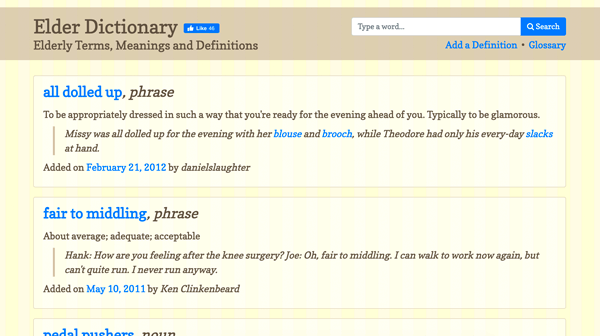
In an effort for humor and eduction I have created a fun website called “Elder Dictionary.” On Elder Dictionary user submitted words and definitions and pooled together to document sayings old people used to say, and some may still. Words include “little bugger,” “smitten kitten,” “davenport,” and a growing list of more! The glossary as of date consists of over 100 words, and is exploding from its soft launch last Sunday (May 8th, 2011).

Elder Dictionary Screenshot

Enjoy!,
Daniel Slaughter


Mar 15 2011

SXSW 2011: Be a Lead Generation Superstar with HTML5 Forms

Chris Coyier
Lead Hucklebucker
Wufoo (@wufoo)

Kevin Hale
Infinity Box Inc

Organizations involved with HTML5

http://w3c.com
http://whatwg.org

Timeline

  • 1990-1995 HTML
  • 1997 HTML3.2
  • 1998 HTML4
  • 2000 XHTML 1.0
  • 2003 XForms: client side validation, but requires a plugin
  • 2004 WHATWG Forms: can’t we just fix HTML? YES!

What is WHATWG?

  • Opera approached W3C with new specifications to work  with current means of HTML. However, W3C basically said no. So, Opera got Safari, Opera, and Firefox involved and formed WHATWG. And then once they had all them, W3C changed their minds and adopted this idea too.

WHATWG Core Principles

  • Backwards Compatible
  • Specifications and Implementations Need to Match
  • More Detailed Specifications

Best Practices for Lead Generation

A lead is information you collect from a user that allows you to take your interaction with them to the next level. Typical Shareware games do 0.5% conversion rate. Flickr is estimated at 5-10%. AdultFriendFinder does 10-22% conversion rate. Amazon.com does a 17.2% conversation rate. And TurboTax online does a 70% online conversion rate.

Steps to Increase your Conversion Rate

  • Labels: the closer the label is to the field, the faster they can process the information.
  • Columns: single column fields do better than double.
  • Number of Fields
  • Pagination: Make sure you establish the progress in which they’re through the form. The moment you don’t they’ll stop.

Types of Speed

  • Infrastructure Speed: how long it takes for the form/page to load from the server to the user.
  • Navigation Speed: how many fields are there? How long will it take to physically go through the form.
  • Cognitive Speed: how much text is there for them to read?
  • Input Speed: are answers pre-selected, or are they not?
  • Validation Speed: how long does it take the user to understand the error?

HTML Composition

  • Semantics
  • Offline Storage
  • Device Access
  • Connectivity
  • Multimedia
  • 3D Graphics
  • Performance
  • CSS3
  • …but what about Forms?

HTML Bad News

  • Very inconsistent browser support even among leading browsers
  • It’s buggy
  • the UI for much of it is ugly
  • The UX for much of it is iffy
  • You’re going to need to write JavaScript fallbacks

Good News

  • You can still use HTML5 form features to make your forms better
  • Some features you can use without thinking twice (eg. type=tel)
  • There are JavaScript fallbacks

Demos

See References below; especially HTML5 Forms Readiness Chart.

So What’s It Missing We’d Like?

  • Implement More of the Spec. Please.
  • Ability to Style Errors and Widgets
  • IE9… Where are you?
  • Drawing Field
  • Location Field
  • WYSIWYG Textarea
  • Access to Camera and Microphones
  • JSON and/or XML as Encoding Type

References

  • HTML5 Forms Readiness Chart
  • Modernizr: To be backwards compatible select Input Type, Input Attributes, and both options under Other.
  • Yepnope.js: If the feature isn’t there, you can load backwards compatible scripts. This is AWESOME!
  • TeleJect: Allows you to get an actual address of a LAT/LONG from the geoLocation data through Google Maps API.

Mar 15 2011

SXSW 2011: Hacking RSS: Filtering & Processing Obscene Amounts of Information

Dawn Foster
MeeGo Community Manager
Intel

Information Overload

There is an obseen amount of data in the world we live in today. Right now we have a mass of 600+ Exabytes of data today (1 Exabyte = 1,073,741,824 Gigabytes).

Most of this information is…

  • Complete Crap
  • Out of Date / Obsolete
  • Not Relevant

So, what techniques can you use to find the information you want?

RSS is a start. Sources you care about delivered right to you, but do you care about everything in each feed? What about feeds you do not subscribe to? Can you keep up with what you have?

Prioritizing your reader

  • Put things you care about at the top
  • Categorize
  • Don’t try to read everything

Outsource / Crowdsource New Sources

The Real Magic is Filtering RSS

  • PostRank: Finds the best posts in a feed ranked on engagement (links, sharing, comments). You can then get an output as an RSS feed, and the feed includes the postrank number as a field.
  • Yahoo! Pipes: Allows you to filter based on any field in the RSS file, not just title and description. The downside is it takes a long time to learn and muddle through.
  • Feed Rinse:Easy to use, not as flexible. Import RSS feeds, and filters, then get new RSS feeds out.
  • BackTweets lets you search Twitter based on a URL regardless of it’s short link.
  • …and many more!

Things to use this with

  • Personal Productivity
  • Understanding the Possibilities
  • Creating prototypes for something you want to build

When not to use it

  • Don’t use in critical or production environments
  • Typically all of this can be done in most programming languages with caching and error checking

References

Dawn Foster’s Blog Post


Mar 14 2011

SXSW 2011: Better Living Through Cloud Computing

Jon Wiley (@jonwiley)
Designer, Search
Google

Cloud computing is still just computing as it’s simply manipulation of storage and data. Cloud computing isn’t really a new thing as it’s been around for quite a while. It’s really an ongoing evolution from the day the internet was born.

SalesForce: No client software was harmed (or used). Basically it’s all on the server, and no clients have the software on their machine.

Jon’s presentation was brought to us by the Cloud via the use of his Google Chrome Laptop, and the internet.

Examples of the cloud are: Google Voice, Dropbox, Evernote, Netflix Streaming, Kindle, Google Maps, Google Translate, Picnik, Aviary’s Phoenix, Pixlr, Mint, PayPal, ING Direct, JayCut, OnLive and OpenTable.

However, there are some limitations to Cloud Computing. The biggest limitation is bandwidth: typically the up-link speed is more important than the download speed. In the USA bandwidth speeds are quite slow. In South Korea they’re proposing having 1 GB/second by 2012. Google proposed their fiber-optics line for 50K-500K people.

The maximum human sensory badwidth is 100,000,000 bits per second. That means South Korea is almost at the speed of human brain power! Woah!

Cloud-augmented: taking previous objects that were not connected to super computers but enable them to do so. For example, the Eye-Fi SD card.

There are some risks/bad things with Cloud Computing:

  • Security: Passwords, Hacking, Phishing.
  • The Patriot Act requires only a supina to access your Cloud. However if it was stored on your physical computer they’d need a Search Warrant.
  • There’s no FDIC for your data.
  • What if the Cloud site closes? Your data is then no longer accessible.
  • What happens when you die with your passwords and data?

Other Links

Guillaume Nery base jumping at Dean’s Blue Hole, filmed on breath hold by Julie Gautier


Mar 14 2011

SXSW 2011: Conserve Code: Storyboard Experiences with Customers First

Joseph O’Sullivan
Lead, Design Innovation
Intuit

Rachel Evans
Principle Research Scientist, Chief Innovation Catalyst
Intuit

Design Thinking

  • Deep Customer Empathy: knowing your customers more than they know themselves
  • Go Broad to go Narrow: if you’re going to get a great idea, you’ll need a portfolio of existing great ideas.
  • Rapid Experimentation with Customers

Storyboards

Storyboards are quick visual steps in how a user in a system executes. The first documentation in history of a storyboard was in 1930 in Hells Angels.

Intuit uses Storyboards in terms of:

  • Web Applications
  • Mobile Applications
  • Customer Care: even before the first phone call, or during it
  • Human Resources: their employees’ experiences throughout their job from the first day
  • Community Support

An Example

Snap Tax is an iPhone application to file your taxes with the ability to take a photo of your W2 and have it instantly populated, ask them additional tax questions, and then pay and file your taxes. When creating this application originally they made a Storyboard which gave them their estimated tax right off the bat with just their W2 and marital status. This Storyboard was also just 6 slides long, and very generalized and simple. If you show a customer a finished product they’re less likely to give you negative feedback because they feel bad. But if you give them a storyboard right off the bat then they’re more likely to. In the end they discovered customers didn’t care if they were getting a refund, or for how much, but rather or not the phone system would actually speed up their process. So instead of showing them their number right away they showed them how easy it was to enter your W2.

  • Pitty Begets Honesty: Customers tend to react to rough sketches more honestly than with finished click throughs.
  • Narcissus Antidote: We’ve never seen anyone fall in love with their storyboard and not change it.

Creating Storyboards

When you’re creating a Storyboard you’re just wondering what’s good or bad with your idea, and what works well with the customer. A Storyboard needs to be aligned with the customer’s problem, solve that it is a solution for their issues, and finally wow them. In every cell of a Storyboard there is something to learn:

  • Do you understand the problem? Is it an important problem?
  • Does your solution solve the problem completely?
  • Lastly, the benefit. What is good about your idea from the customer’s perspective? Will it delight them?

A 6-cell storyboard should have these cells: goal, problem, solution, solution, solution, benefit

In setting up a storyboard you should consider these things:

  • What’s the project?
  • Who’s the customer? Get specific: age, gender, experiences with similar products, etc.
  • What’s the problem? “I’m trying to __(goal)__ but __(problem)__.”
  • What’s the solution? Three most important moments that need to occur for the solution to execute
  • What’s the benefit? This isn’t the feature list. It’s what’s beneficial to the customer, and doesn’t include any of the words how you would describe the features to your boss.
  • Now that you have the customer problem, the solution, and the customer benefit, what do you want to learn about it? Your goal is to gather as much new feedback as possible. It’s what’s not clear to you about what you have completed so far.
  • Now it’s time to draw.

Mar 13 2011

SXSW 2011: Stop Dreaming, Start Doing: Tips For Execution

Scott Belsky
CEO
Behance

The problem is that most ideas never happen. Sure, some ideas should never happen. Even the greatest ideas suffer horrible odds. Ideas do not have to be because they’re great or obvious.

The Project Plateau

You’ve got a great idea, it’s exciting and you’re loaded with energy. Eventually you hit this plateau where your creative energy dies, and you give up on it. But as humans we love having these great ideas, so instead of completing the first one we just create a new one; over and over.

  • How organized are you? Only 7% of people say they’re very organized.
  • Lack of Leadership Capability: not being able to leverage your team and use people for what they want/need/can be used as will fail.
  • Lack of Feedback Exchange: we’re not getting the insights we need to keep going.
  • Disorganized and Isolated Networks: We’re not thinking about professional networks in putting our ideas together.

Making Ideas Happen

  • Creative Ideas
  • Organization and Execution
  • Communal Forced
  • Leadership Capabilities

Overcome Reactionary Workflow: email, SMS texts, facebook, twitter, etc. These things pull us away from what our overall goal is. Ceativity * Organization = Impact: If you have all the creative inspiration in the world, but no organization, your impact will still be 0.

The Action Method

  1. Action Steps: the ideas
  2. Back-burners: everything that piles up on our desks
  3. References

Action Steps

If you enter a meeting and you don’t exit without knowing anything, then you shouldn’t be doing them. Standing meetings, or creating an agenda are good. Having a culture of capturing Action Steps where you confirm they’re written down what they need to do (it’s kind of Big Brother). Another good technique is to go around in the last few minutes of the meeting and confirm everything there is you’ll need to do based on this meeting, just to confirm you gathered it all. If you do not do this, then you’re just destine to have a meeting again in a couple weeks.

Back-burner

Progress Begets Progress: Hang things around your desk with milestones and tasks (such as sticky notes) to make sure you’re doing things. Prioritize Projects Visually: make a chart with project priority board with Extreme, High, Medium, and Low. This way you have accountability to say “I didn’t get project X in High done as project Y in Extreme was mentioned as more important.”

Reduce your amount of insecurity work (facebook, twitter, analytics, etc). The best method is to ignore everything until a certain time you set in every day (such as at the end) and then handle it all then instead of trying to handle it throughout the day.

Types of People

  • The Dreamers: Tendency is to always focus on the new. Right before execution they want to add all these new features. They’re always thinking how they can make it better and add things to the project.
  • The Doers: They are the downers. They don’t want to do things as they have deadlines they will not make.
  • The Incrementalist: Very good at rotating between the Dreamers and Doers. Sure, you’d think this is what you want to be. Instead the problem with them is they just end up creating too many different things.

There really isn’t a good type of person. The best thing to do is to assign these to someone, and only have them focus on their own category. Then rely on your community to keep you accountability. But should you be scared that the community will steal your ideas? Well, the idea is no ideas ever get done anyways, so even if they get stolen at least you were more inspired to attempt it. As well, if they idea is so great then it’s probably not something easy to do that anyone else wants to do anyways. Another technique is to share ownership of ideas because everyone will have different views and approaches to complete the goal. Basic line: The benefits of distributing ideas outweighs the costs.

Seek Competition

Don’t get discouraged if someone else has already done it. What we’ve found are the most successful companies have spent time thinking how they can pace themselves with other similar businesses or ideas. Fight your way to breakthroughs by arguing about a topic as people get emotional about it, and great ideas come out. Eventually people will start to give in with Apathy and just say, “fine, whatever.” When that happens, don’t let it. Make them argue back. Don’t be burned by Consensus.

Overcome the Stigma of Self-Marketing

Use twitter, facebook, newsgroups to get people involved in your idea or product.

Leaders Talk Last

Let everyone else talk first, and then voice your opinion after you have a chance to absorb everyone’s ideas. If you talk first, then everyone else will just agree with what you’ve said and you’ll never get their ideas heard.

Value the Team’s Immune System

The Dreamers need to be the only ones involved in the Brainstorming process. The Doers then need to be involved after the initial Brainstorming, and the Dreamers need to keep silent. It’s the best way to get through things and result in a finished project.

We need to say in the business plan to allow for failure. You should plan for 20-30% of your development to be failure. This way you have that time, and your company will be the most creative.

When you’re interviewing new people for your team you should ask then, “What did you do to take initiative on your hobby/interest/experience XYZ?” Their initiative is more valuable than anything else; since just doing it isn’t taking initiative.

Gain Confidence From Doubt

When more and more people start to doubt you, you start to become more confident. When 99% of people think you’re crazy, you’re either crazy or you’re on anything. Society is very critical and shuns what society celebrates. Usually everyone who’s successful has dropped out of college or done everything no one said they could do.  So, honor this. Do this. Be this.

Nothing extraordinary is every achieved by normal means.


Mar 13 2011

SXSW 2011: One Codebase, Endless Possibilities: Real HTML5 Hacking

HTML5 HackingJoe McCann
Principal Architect
subPrint Interactive

What is HTML5?

HTML5 is just the next version of HTML, and don’t expect it to solve all your problems.

What is the HTML5/Web “Stack?”

HTML is the “Content” of the application; the .html file. The styling is your CSS. And the business logic is the Javascript.

Benefits of the Web Stack

For the business individuals, there is an important concept that needs to be covered. There are value propositions which you want to have native development in languages such has Java, C++, Ruby, etc.

For majority of applications, however, you can the Web Stack (HTML/CSS/JS) without needing to know all the different environments.

When you’re designing your application there are some serious issues you may run into. Typically with a native design you’ll need designers who can develop across all different languages. However with HTML it’s just one language. HTML has native web components, and it’s cheaper to hire designers just for the web than everything else. There are many more web-designers than there are in other languages.

But what about maintenance? Across languages pushing updates requires updating to all different platforms. This can be costly, and time consuming.

Keep in mind HTML5/Web Stack does not solve all of these problems.

Web Stack Benefits

  • Significantly reduces development costs
  • Significantly reduces design costs
  • Maintenance becomes easier
  • A single codebase

Tool of the HTML5/Web Stack

  • Phonegap: bridges the gap between multiple phones through HTML and Javascript Bindings for things such as the camera, accelerometers, etc.
  • Sencha Touch: HTML5 development tool-kit for creating native applications using web technologies.
  • Appcelerator Titanium: Not only do they have cross mobile applications, but they also have desktop applications too!
  • jQuery Mobile: Uses HTML5 tag elements united with jQuery. It’s theamable, but really in early stages of development.
  • Yahoo! Query Language (YQL): not necessarily a framework or something that will create a user interface. This essentially turns the entire web into an API. It allows you to screen scrape websites (wow!). It allows you to create an SQL statement to parse through the HTML and respond back with XML or Json with what you want. This allows you to make calls with Javascript.
  • Node.js: Very easy to use, very fast. Allows you to write javascript on the client side, but then also use that code on the server. This makes it really nice for form checking. Basically if you can write Javascript, well, then you can now write server back-ends too.

One Codebase (How, Setup, etc)

First you need to figure out what is it you’re targeting: Google Chrome, Mobile Safari, Android Chrome, Native Mac OSX, Native Android App, etc.

Clearly there’s a server-side component you’ll need, but you can still use Javascript through Node.js.

Demos

http://freebeernear.me/ (click here for the code)

References

If you’d like to see this presentation you may so here.


Mar 12 2011

SXSW 2011: Metrics-Driven Design

Joshua Porter (@bokardo)
VP UX
Performable

Doug Bowman

Doug Bowman is the lead designer at Twitter. A few years ago Doug wrote a blog post about leaving Google, where he was hired three-years prior. He was really the first real designer hired at Google. There are very few hires like that who get so much press and people talking about it. Doug’s post was a post that he was leaving Google, and usually when you write these sorts of posts they follow the same type of formula: this is my last day, I’m sorry about leaving, and my co-workers are great. However, Doug’s post was nothing like that at all: “Unfortunately for me, there was one small problem I didn’t see back then.” And that’s the problem we’ll talk about in this session: 41 shades between each blue (the best they found was HEX #2200C1) to see which one performed better, and an argument over the width of a border (1, 2, 3px). Bing was/is using a different HEX color, which their UX Manager estimated being a loss of $80 million dollars. The data testing culture becomes a crutch for every decision, paralyzing the company and preventing it from making any daring design decision.

Spectrum of Design

Intuition-Driven (Doug)

  • Instinctive
  • Subjective
  • Daring
  • Follow other people’s practices
  • Trust your gut

Data-Driven (Google)

  • Everything is tested by small numbers, and small variables
  • This process is very slow
  • You rely on data for decision making
  • You don’t trust your gut

Imagine that Your Design is a Mountain

Your existing design is on the side of a little mountain. With an engineer’s approach you can only get to the top of that little mountain. An engineer quickly gets to a diminishing return as they can only go so high with the current design approach. It’s really dissapointing  because you’ll eventually hit a ceiling where you cannot go any higher, known as a “Loci Maxima” in calculus.

Our goal is to be at the top of the largest mountain where our goal is the best (or even just a better) design.

  • Optimization asks: What works best in the current model?
  • Design innovation asks: What is the best possible model?

What are Metrics?

Metrics are simple numbers that measure the effectiveness of your business.

  1. Metrics reduce (but don’t take away all) arguments based on opinion.
  2. Metrics give you answers about what really works. They can also lead you down a rabbit hole, but if you do testing and you have valid data they can give you answers about what really works.
  3. Metrics show you where you’re strong as a designer. They also show you where you’re weak as one.
  4. Metrics allow you to test anything you want. Metrics actually empower you to try anything, where as before you’d have to sell someone on a crazy idea.
  5. Clients love metrics.

Principle: Your metrics will be as unique as your business.

Vanity Metrics are thing such as old-school graphical hit-counters, which you shouldn’t rely on.

The Usage Lifecycle

  • Interested
  • Trial/beta User
  • Customer
  • Passionate Customer

Acquisition Metrics

  • How much did it cost to gain your customer? (Cost per Acquisition, CPA)
  • If your CPA is higher than their life-time earnings, then it’s not worth it.
  • Comparative Metrics: knowing where users came from, and their cost and outcome based on those.
  • The best acquisition outcome is still from Email Lists.

Engagement Metrics

  • Hits
  • Page views
  • Visits
  • Unique Visitors
  • Returning Visitors
  • Registered Users
  • Customers
  • Frequency
  • Time on Site
  • Daily Active Users

Cohort Analysis: Engagement over time. For instance, the number of customers remaining after every month from sign-up. This is very valuable.

Satisfaction Metrics

Net Promoter Score: How likely is it that you would recommend our company to a friend or colleague? (ligart 1-10. 1-6 is “Detractors”, 7-8 is Passives, and 9-10 is Promotes).

Mint.com: “Maybe we didn’t have a high viral coefficient score, but we had a great satisfaction metrics.”

Emergent Metrics

Having friends inspires continuous use.

“Find the people you know” is a good example of this.


Mar 12 2011

SXSW 2011: Seth Priebatsch, Keynote: The Game Layer on Top of the World

Seth Priebatsch
Chief Ninja
SCVNGR

The Last Decade: Social Layer -> Connections

  • Last decade
  • All about connections
  • Facebook’s Open Graph
  • Construction is over

The Next Decade: Game Layer -> Influence

  • Next decade
  • All about influence
  • No set foundations
  • Construction has just begun
  • Seeks to act on individual motivation: why, how, when we do things
  • Has the opportunity to be 10x larger than the Social Layer

The Game Layer: real behavior in the real world, emulated in the digital world.

What can the game layer do for me?

Schools

School is a game, it’s just a poorly designed one. With a school you have: motivated players, challenges, rewards, rules, allies, enimies, levels, appointment dynamics, countdowns, initiatives, penalties, etc. The problems with schools is they’re not Engaged since grading is broken, and there’s cheating. Engagement is an incredibly critical concept which all game developers are aware of. Because the grading system in schools is broken, it has created the “Moral Hazard of Game Play.” It’s replaced the real reward for a letter, and these become chores.

Grades are failing as rewards. They are simple game levels Valedictorians, percentiles, and honor student status. The problem is these titles are boring. As well, these are game mechanics where people can loose, and this is not what we want in education. So why not create a grading dynamic where you start at 0 points, and then you gain points to focus on the positive. This way you cannot fail, or go negative point. It’s all about focusing on the end result.

So what about cheating? Princeton removed professors from the class room when tests were being taken and just required everyone to write down the code of ethics, and the realization

Customer Acquisition

Groupon:

  • Free Lunch: show the customer that although they’re skeptical, it’s still ok.
  • Communal Gameplay: the community needs to hit 50 people before “the deal is on.”
  • Countdown: Time left to buy. Everyone understands it, but it creates this huge exponential spike of activity right before it’s up.
  • Email List

Loyalty

Status: the idea of being a regular at a place. American Express uses status very well because they have levels, and they make you feel better based on the color of your card.

The “Level Up”: Jumping from one level to another.

Inclusive Ownership: everyone owns it, and so everyone benefits from it.

LBS -> Mainstream

How do you move location based services from something that isn’t mainstream, to something that is?

Big Partners + Big Money = Big Results. The problem is just a wee-little bit of the world uses these location based services. So how do we get everyone in on it?

Quantitative Easing: what the federal government does to flood the economy with new dollar bills, without actually having the value. They’re doing this because the “game” is too hard, and sometimes it makes sense to look at the rules and refactor them.

Tightly vs. Loosely Location-Based: basically, to play tightly based location you MUST be at a location. You cannot just be somewhere else. Because of this, it limits the number of people who can be engaging at that place at any one time. If you loosen this rule, then the number of people increases substantially.

Reward Schedules: everyone in the space naturally gets the question, “What do I get in exchange for doing this?” Everyone who’s doing LBS has some form of reward, badge, specials, etc. Rewards work really well. The problem is as once you’ve checked in and gotten the reward, you wont get it next time. As well, this reward will not be offered everywhere, just at certain places.

Global Warming

Not any one thing can solve these problems. While one thing cannot solve these massive problems, it can still give us the tools to move from something impossible, to something that’s just really hard to solve (but still possible!).


Mar 12 2011

SXSW 2011: Your Mom Has an iPad: Designing for Boomers

John McRee (@johnmcree)
Lead User Experience Architect
EffectiveUI

EffectiveUI was brain storming ideas of what would be a good topic at a conference, and this was what John came up with. The idea stuck, and the office and industry had a great reaction to the idea. The question simply is: is designing for boomers important or relevant.

John recites a poem:

A computer was something on TV
From a science fiction show of note.
A window was something you hated to clean,
And ram was the cousin of a goat

Meg was the name of my girlfriend.
A gig was a job for the night.
Now they all mean different things,
And that really mega bytes.

An application was for employment.
A program was a TV show.
A cursor used profanity.
A keyboard was a piano.

Memory was something that you lost with age.
A CD was a bank account.
And if you had a three-inch floppy,
You hoped nobody found out.

Compress was something you did to the garbage,
Not something you did to a file.
And if you unzipped anything in public,
You’d be in jail for a while.

Log on was adding wood to the fire.
Hard drive was a long trip on the road.
A mouse pad was where a mouse lived.
And a backup happened to your commode.

Cut, you did with a pocket knife.
Paste, you did with glue.
A web was a spider’s home.
And a virus was the flu.

I guess I’ll stick to my pad and paper
And the memory in my head.
I hear nobody’s been killed in a computer crash,
But when it happens they wish they were dead.

Interesting Information

In truth, Boomers love technology. The older generations are really something to focus in. The younger generation is powering forward, but we need to learn as much as we can to support everyone.

More and more older individuals are using the iPad. The Nintendo Wii, for example, spent a lot of it’s marketing on a non-traditional gaming market, including elders.

Boomers comprise more than a third of the online population. Compared with non-boomers, they consider themselves more savvy than the rest of the population. 47% of internet uses ages 50-54 are using networking sites, 26% of 65+ are too. Percentage using social networking by age is on the rise, it’s a pretty straight linear trend right now.

Between the ages of 50-64 Twitter use has went up 120%!

Boomers spend the most money on technology because they have it. Close to 80 million Americans controlling 50% of the country’s discretionary spending. Boomer women spend more money in all channels than women from all other generations (Forrester Research). They outspent younger adults by $1 trillion in 2010.

The oldest members of the Baby Boom generation turn 65 this year. They’re too young to have any personal memory of WWII, but old enough to remember the postwar American High. There are 79 million Baby Boomers, which is 26% of the population

How to design for Boomers?

Well, we don’t. Design for goals and behaviors, aptitude, and attitude, not generation. Age isn’t something you should really focus on unless it’s a very specific audience. However, there are patterns to consider.

  • Like to learn new technologies and share their knowledge: but really, who doesn’t?
  • Want technology to be safer
  • Want technology to be easier to use
  • See technology as a tool
  • Expect technology to adapt to them

Like to learn new technologies and share their knowledge: but really, who doesn’t?

The Kickass Curve: Once you get someone through the sucky part of using new technology, then they get into this cool area where they can start to use technology and “Kickass.” When someone becomes “Kickass” then they want to show all their friends, and promotes the product. So, how do we make a product Kickass?

  • Overlay the product with instructions.
  • Point to obvious places where you interact and get at the functionality of the product.
  • Keep it simple, sleek, and easy to use. Give little tid-bits of information on where to start, and where to go. Sure you can have the ability to dig in deeper and get crazy, just simple on the interface. Just get them through the “suck threshold” as soon as you can.

Want technology to be safer

Use things like loading bars, use pagination so people know how to jump forward and backwards in steps. Use strong visual design to establish trust. An ugly website will scare people of how reputable it is.

Want technology to be easier to use

Consistent navigation and behavior. Don’t have a bunch of ways to navigate the website. Have a consistent nomenclature: Submit, Continue, Proceed, Cancel, Go, etc.

See technology as a tool

Increasing features doesn’t make something easier to use. The “feature race” is competing to have the most amount of features in your apps. The people in the “UX” stage are the little guys competing against bigger companies with lots of features. Boomers just simply want a nice feature, and nothing else as it gets confusing.

Expect technology to adapt to them

They want to be able to talk to people, to communicate, and do it easily.

Accessibility

In the workforce 42% of people have a significant disability when nearing retirement. The workforce benefiting from accessibility tech is 60%: GPS speech output, closed captioning, accessible software. The self perception of aging is “disability” is a huge turn-off. Even seniors when asked if they’re old, they’ll deny it. No one wants to click on something to acknowledge they’re old.

  • Limit on-click events
  • Use external labels on forms, and don’t have the text box change when you click into it
  • Meaningful links of what it means, not just “learn more…”
  • Make sure color contrast is there. There are tools on Google where you can enter the foreground and background color and it will give you a number on how much it contrasts.

Session Summarize

Boomers want to learn and share safe, easy to use technology as long as they see it as a tool that’s useful. Make sure you design for goals and behaviors, aptitude, and attitude; not generation.